Back to Training
Hotel Bookings

How to Book Hotels with FX-Port

Master hotel search, understand rates, manage reservations, and optimize your hotel sales strategy.

Hotel Booking Overview

FX-Port works with multiple hotel suppliers worldwide to offer global coverage and access to negotiated fares with partners having strong footprints in specific regions. Our platform integrates with major hotel chains, independent properties, and local accommodations to provide you with competitive rates and exclusive inventory. Whether your customers are looking for budget accommodations, luxury resorts, or business hotels, FX-Port connects you with the best options available.

Key Benefits: Access to 1M+ hotel properties globally, negotiated B2B rates with partner suppliers, instant booking confirmations, flexible cancellation policies, and real-time availability updates across all properties.

Add Commissions to Hotels

Before booking hotels on FX-Port, you need to configure commissions on your account to set your prices and margins. For a comprehensive guide on setting up commissions, please visit our Set Commissions section in the Getting Started guide. Below we provide a quick reference and key information specific to hotel bookings.

For detailed setup instructions, visit our complete commission guide in the Getting Started section. There you'll find step-by-step instructions for adding commissions, additional examples, and important considerations for all service categories.

Understanding Search Results and Hotel Filters

After searching for hotels, FX-Port displays available properties with all the information you need to make informed decisions. Learn how to read search results, use filters effectively, and find the perfect accommodation for your customers.

Hotel Search Result Cards

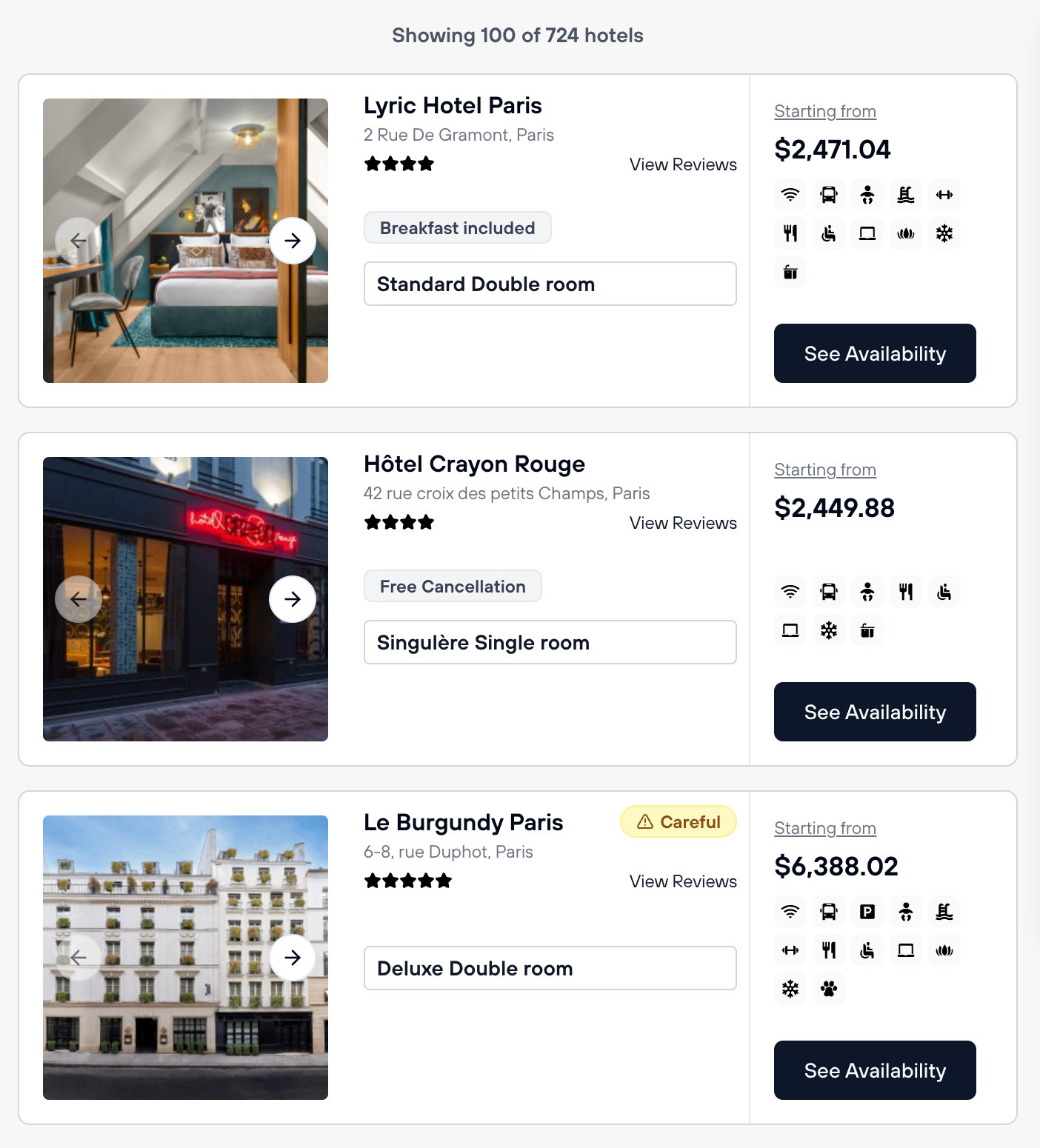
Each hotel in the search results displays key information in a card format, allowing you to quickly compare options and identify the best matches for your customers.

Hotel search result cards showing property name, images, reviews, amenities, and starting price

Screenshot: Hotel result cards displaying property name, images, location, star rating, reviews, starting price, and primary amenities.

What Information Each Hotel Card Shows

  • Property Name & Location: Hotel name and address in the destination city
  • Photos: Click on images to view them in larger format. Properties include multiple photos showing rooms, facilities, and common areas
  • Star Rating & Reviews: Hotel star rating (1-5 stars for hotels; note that apartments do not have ratings). Click "View Reviews" to see guest feedback
  • Starting Price: The cheapest room rate available for your selected dates
  • Primary Amenities: Key features displayed as icons below the price (Free Cancellation, Breakfast Included, etc.)
  • Available Amenities Icons: Parking, Wi-Fi, Air Conditioning, Swimming Pool, Beach Access, Spa, Kitchen, Disability Access, and many more

Important Notes About Hotel Card Information

  • Free Cancellation Availability: Even if the cheapest room doesn't show free cancellation, the hotel usually offers it at higher price points. Click the hotel card to open detailed view and confirm free cancellation rooms are available
  • Meal Inclusions: If meals (breakfast, dinner, half-board) appear for the cheapest room, higher-priced rooms often include them too. Check the detailed hotel page for all meal options
  • No Ratings for Apartments: Apartment listings don't have star ratings, so you won't see rating badges. This is normal—apartments are self-catering accommodations without traditional hotel services
  • Click to Expand: Click on any hotel card to open it in a new tab, where you can see all available rooms, complete amenities list, detailed photos, full reviews, and policies

Interactive Hotel Map

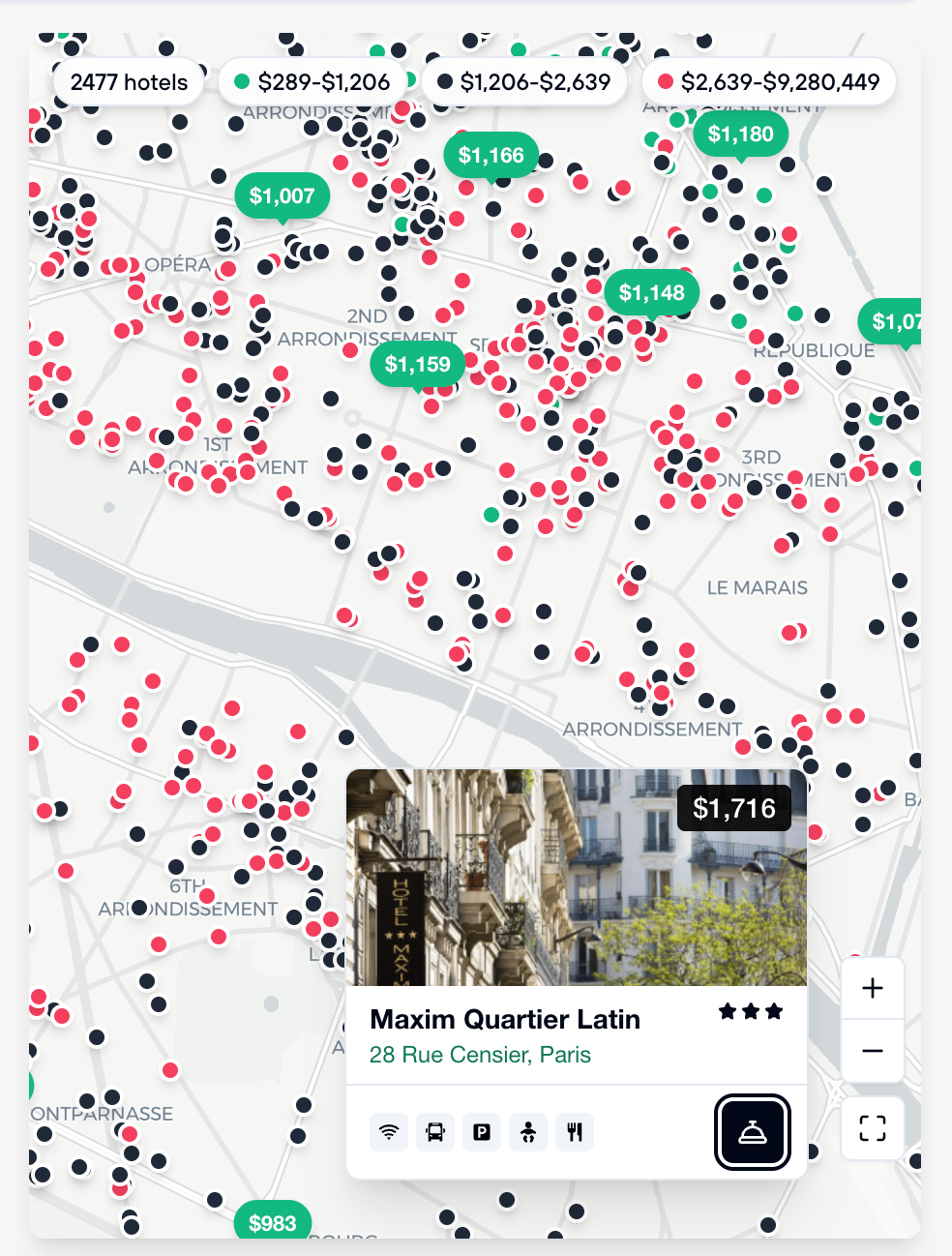
On the right side of the search results, FX-Port displays an interactive map showing all available hotels in the destination. This helps customers visualize property locations and compare options geographically.

Interactive hotel map showing properties color-coded by price range with hotel details on hover

Screenshot: Hotel map with color-coded markers, price ranges, and hotel information popups.

Understanding Map Colors & Features

  • Green Dots: Hotels in the cheapest price bracket. Click to see price, name, and details
  • Black Dots: Hotels in the medium price bracket
  • Red Dots: Hotels in the expensive price bracket
  • Click on a Dot: Clicking any marker displays a popup with the hotel name, location, price, and quick amenities overview
  • Expand Button: Click the expand icon to view the map in full-screen mode. This is helpful when customers want to explore a specific area or compare hotel locations

Using Hotel Filters

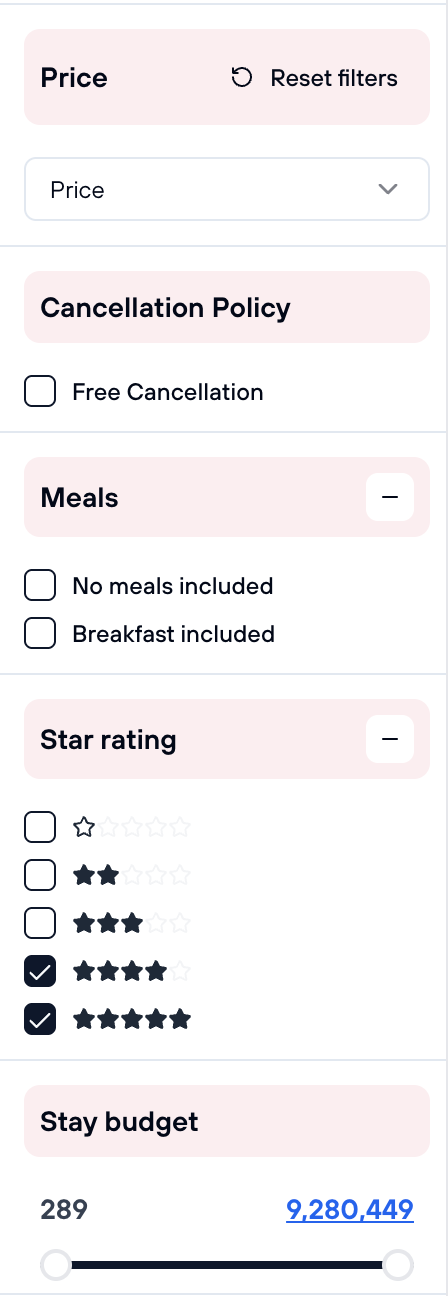
FX-Port provides powerful filters to narrow down search results based on specific requirements. These filters work together to help you find exactly what your customers are looking for.

Price Sorting

Sort the hotel results by different price criteria to find options that best fit your customer's needs:

  • Recommended: Default sorting combining price, rating, and availability for best overall match
  • Cheapest First: Shows lowest-priced hotels at the top, ideal for budget-conscious travelers
  • Most Expensive: Shows premium hotels first, useful when searching for luxury accommodations

Cancellation Policy Filter

Filter for hotels offering free cancellation. This is useful for customers who want booking flexibility:

  • Free Cancellation: Only shows properties with free cancellation on the cheapest room rate displayed
  • Important Reminder: Even if the cheapest room doesn't have free cancellation, the same hotel usually offers free cancellation at higher price points. Use this filter as a starting point, then click individual hotels to find their free cancellation options

Meals Filter

Filter hotels by meal inclusions. This helps customers plan their trip and budget for meals:

  • No Meals Included: Room rate without meals
  • Breakfast Included: Room rate includes breakfast daily
  • Note: Like cancellation policies, if the cheapest room doesn't have meals included, more expensive rooms often do. Check the detailed hotel page to see all meal options available

Star Rating Filter

Filter hotels by star rating to find properties matching your customer's quality expectations:

  • 1-5 Star Options: Select specific star ratings to narrow results to luxury, mid-range, or budget properties
  • Apartments Don't Have Ratings: If you filter by star rating, apartment listings won't appear in results. You may be missing good value apartments, so consider searching without star rating filters to see all accommodation types

Stay Budget Slider

Control the price range for hotel stays. This is one of the most powerful filters for narrowing results:

  • Drag the Slider: Adjust the minimum and maximum price to show only hotels within your customer's budget
  • Click to Edit Directly: You can click on the price amounts at either end of the slider to type in exact amounts instead of dragging
  • Real-Time Updates: Results update instantly as you adjust the budget range, showing only hotels within your specified price limits
Hotel search filters showing price, cancellation policy, meals, star rating, and budget sliders

Screenshot: Hotel filter panel with all available filtering options for price, cancellation policy, meals, star rating, and budget control.

Review Hotel Room and Cancellation Rules

Once you've found a hotel that matches your search criteria, click on the hotel card to view the detailed preview page. This page contains all the information you need to make an informed booking decision, including room options, cancellation policies, amenities, and hotel details.

Hotel Preview Page

When you click on a hotel card, FX-Port opens the hotel's detailed preview page. Here you can review comprehensive information about the property before making a booking decision.

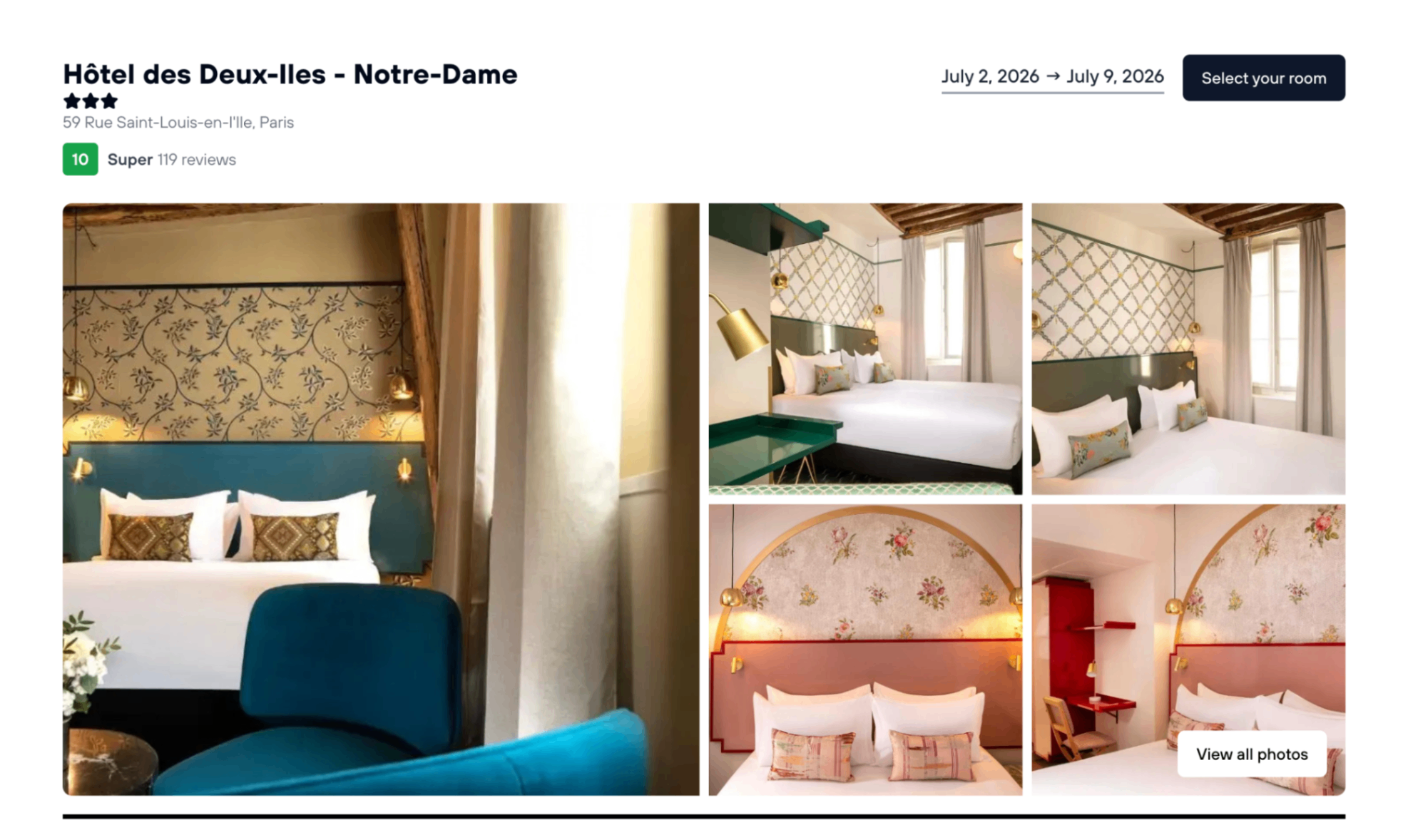
Hotel preview page showing property name, images, reviews, and room selection options

Screenshot: Hotel preview page displaying property photos, reviews, ratings, location information, and available room options.

Hotel Preview Features

  • Hotel Gallery: Browse all available photos of the property, rooms, and amenities
  • Guest Reviews: Read verified reviews from previous guests to understand their experience
  • Star Rating: Quick visual indicator of overall property quality
  • Change Dates: Modify your check-in or check-out dates without returning to search if needed

Room Selection and Quick Filters

Below the hotel preview, you'll see all available room options. FX-Port provides quick filters to help you find the perfect room based on your customer's preferences for cancellation policy and meal inclusions.

Quick Room Filters

  • Free Cancellation: Show only rooms that offer free cancellation for maximum booking flexibility
  • Breakfast Included: Filter to show rooms with complimentary breakfast
  • Dinner Included: Filter for rooms that include dinner in the rate
  • Full Service (All Meals): Filter for all-inclusive room packages with all meals included

Understanding Cancellation Policies

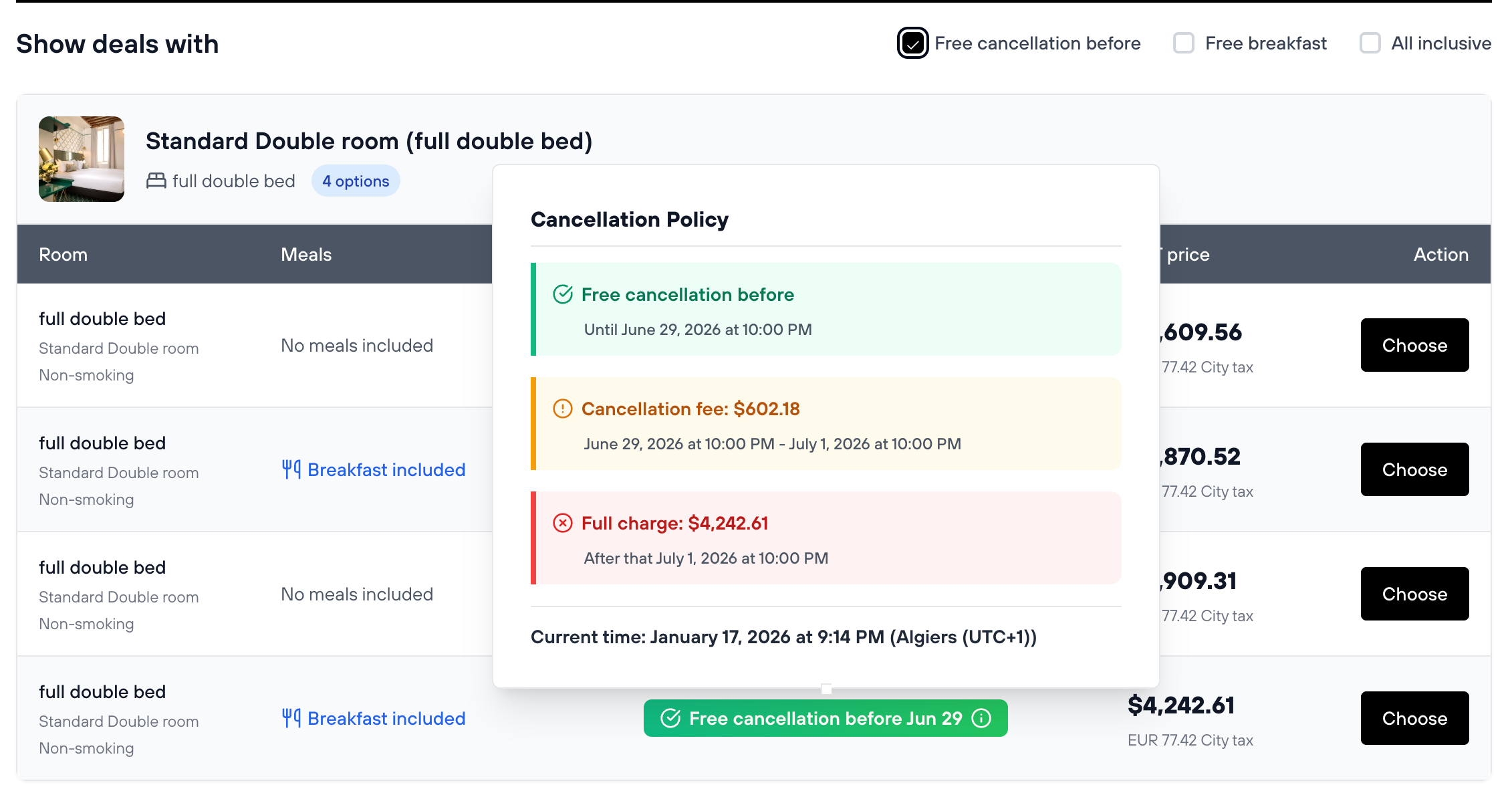
Cancellation policies vary by room type and hotel. When browsing room options, you'll see free cancellation badges. Hover your mouse over these badges to view the exact cancellation policy details for that specific room.

Room selection showing cancellation policy badge with hover details

Screenshot: Hover over the free cancellation badge to see exact policy details including cancellation deadlines.

Hotel Cancellation Policy Types

  • 1.
    Free Cancellation Before a Specific Date:

    Guests can cancel for free up until the specified deadline. After this date, cancellation fees or charges apply.

  • 2.
    Partial Refund (Cancellation Between Two Dates):

    If cancellation occurs after the free cancellation deadline but before a later date, guests receive a partial refund (typically 50-75% of the booking) and lose the remainder.

  • 3.
    No Refund (Non-Refundable):

    Cancellations after a specific date result in no refund. The guest loses the entire booking amount.

Important: Cancellation Policy Communication

It is critical that you clearly communicate the hotel's cancellation policy to your customers before they confirm their booking. Make sure they understand:

  • The exact cancellation deadlines
  • Whether cancellations are free, partially refundable, or non-refundable
  • Any applicable cancellation fees or penalties

This policy information will also be printed on the reservation voucher during the booking stage, providing your customer with a written record.

Important: VAT and Local Taxes

CRITICAL: VAT and Taxes Paid at Hotel

Some cities and countries charge VAT (Value Added Tax) or other local taxes on hotel stays. These taxes are levied by law and must be paid by the guest directly at the hotel during check-in or checkout. They cannot be paid online through FX-Port or any booking platform.

Important for Your Customers:

  • VAT/taxes are charged in addition to the quoted room rate
  • The hotel must collect these taxes directly from guests as required by local law
  • While some hotels may overlook this fee, in certain countries enforcement is strict
  • Guests should budget for these additional costs and be prepared to pay them at the property

Always inform your customers about potential VAT/taxes for their destination to avoid surprises at check-in.

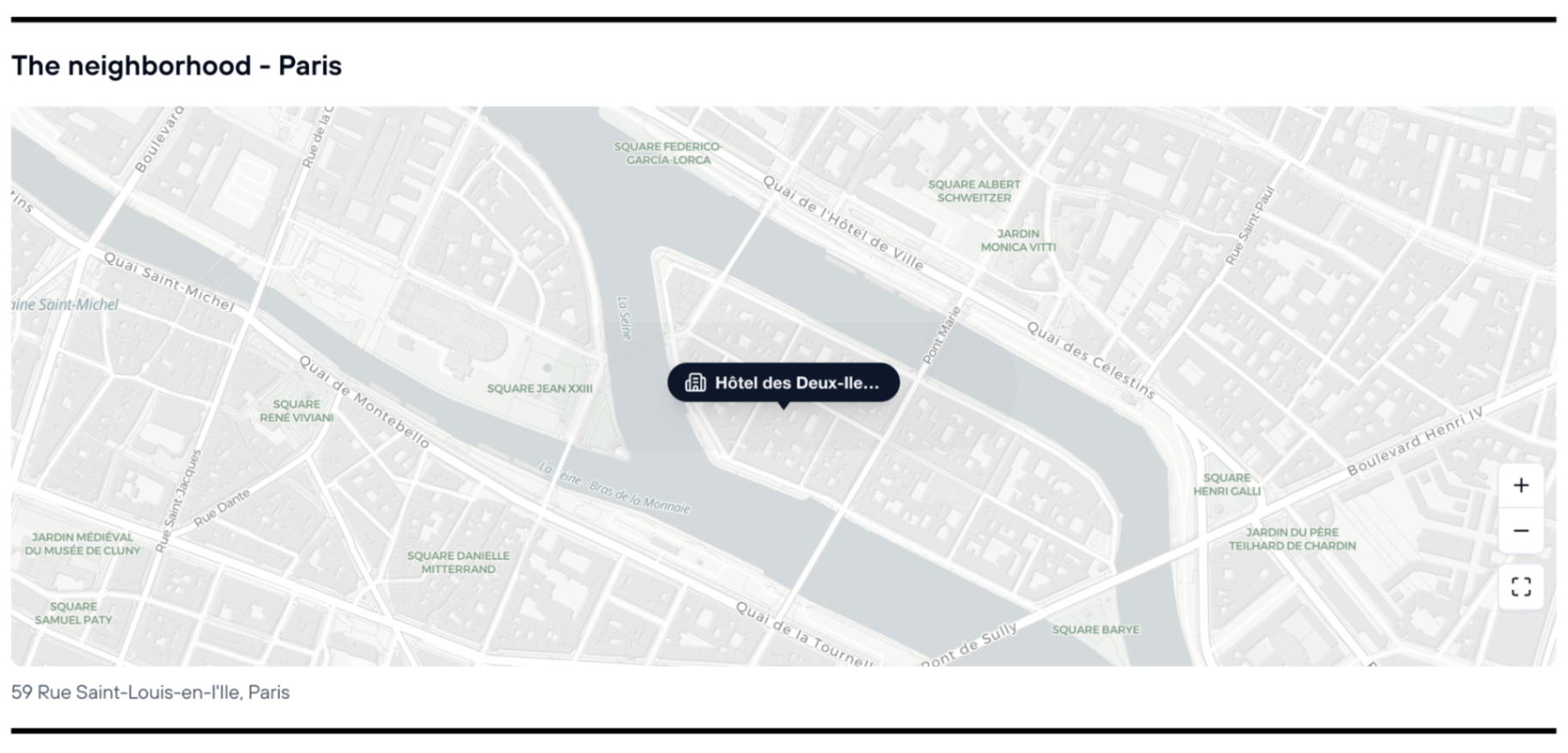
Hotel Location on Map

View the hotel's exact location on an interactive map. This helps your customers understand the property's location relative to landmarks, attractions, public transportation, and the city center.

Interactive map showing hotel location in the city

Screenshot: Hotel location displayed on an interactive map showing nearby landmarks and attractions.

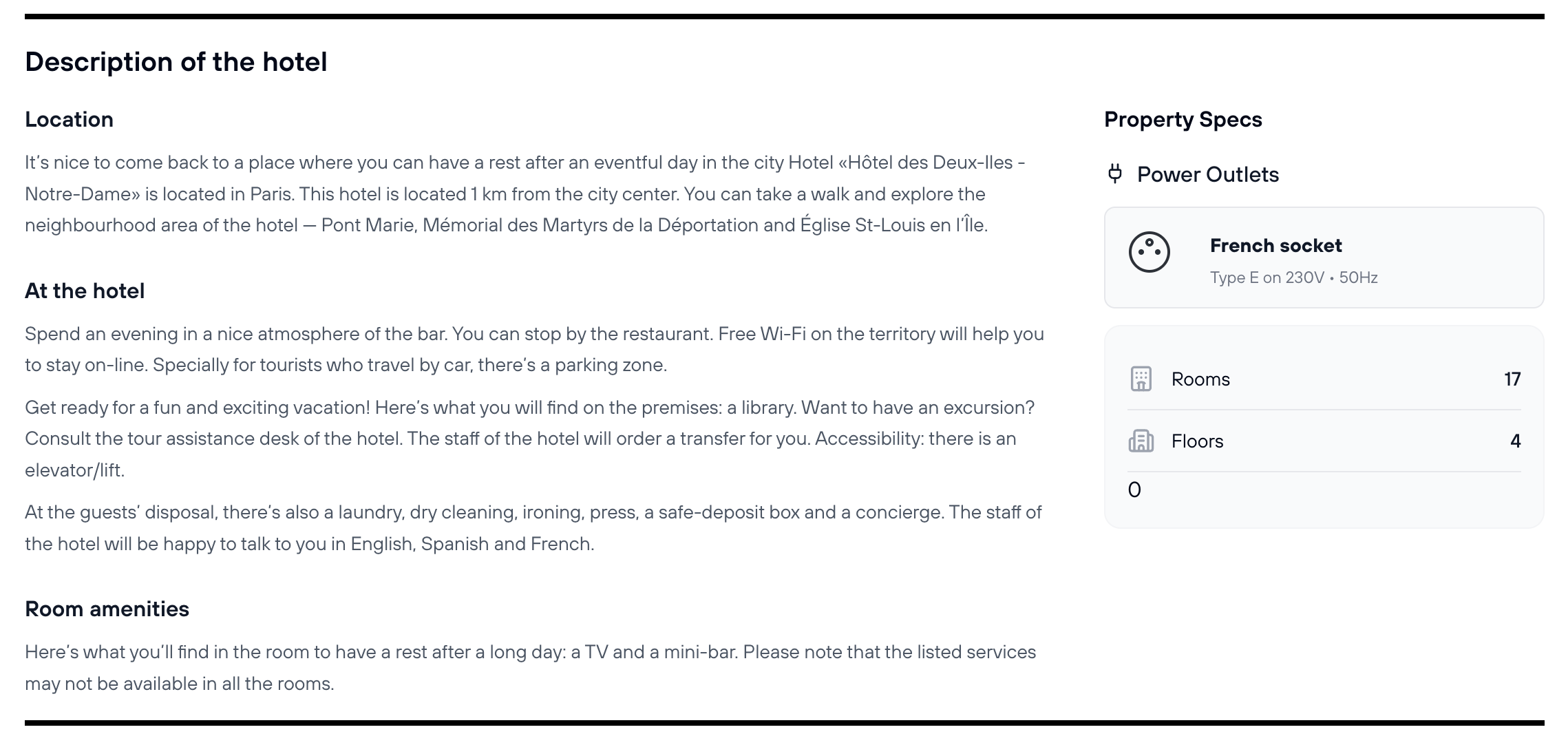
Hotel Description and Details

Read comprehensive information about the hotel property. This typically includes:

  • Property History: Background and heritage of the hotel
  • Building Age: When the property was constructed and any recent renovations
  • Number of Rooms: Total guest rooms available in the property
  • Electrical Outlets: Types and specifications of power outlets available (important for international travelers)
  • General Description: Overview of the property's character, amenities, and services
Hotel description showing property history, age, number of rooms, and details

Screenshot: Detailed hotel description with information about property history, building age, and specifications.

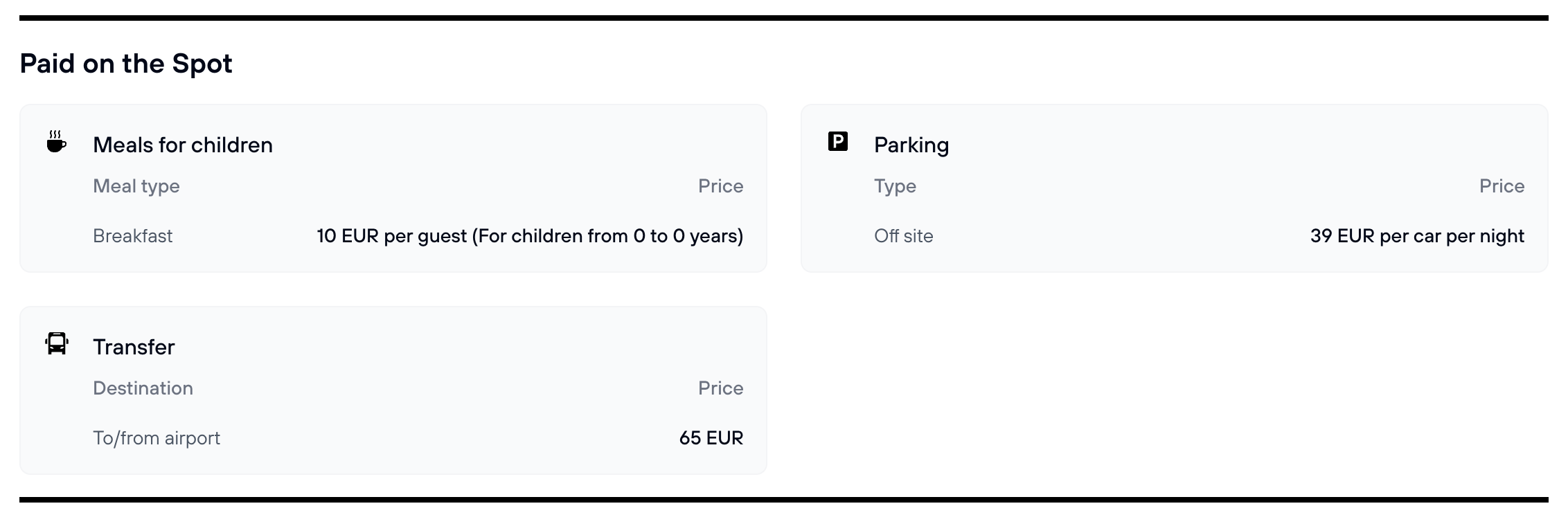
Hotel Additional Paid Services

Many hotels offer additional services that guests can purchase. These services are paid directly to the hotel (not through FX-Port) either during booking or at the property. Common paid services include:

  • Airport Transfers: Shuttle or car service to/from the airport
  • Parking: On-site or nearby parking facilities
  • Breakfast Service: If not included in room rate
  • Late Checkout: Extended checkout time beyond standard hours
  • Early Checkin: Early arrival accommodations subject to availability
  • Other Services: Laundry, spa services, tour bookings, and more
List of hotel additional paid services including parking, transfers, and breakfast

Screenshot: Additional paid services available at the hotel with pricing information.

Hotel Amenities

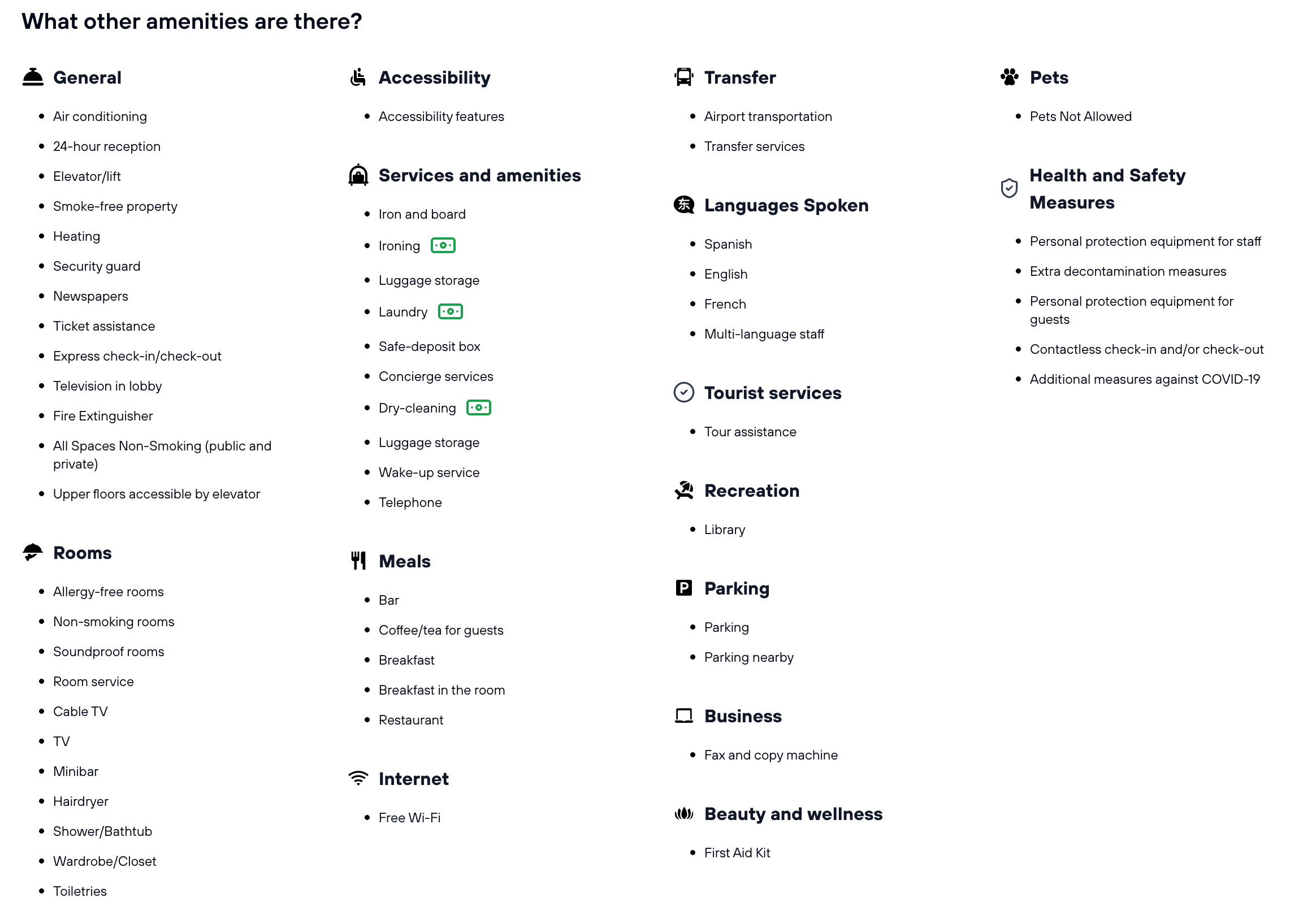
Hotels offer various amenities for guest use. Most amenities are included at no charge, though some premium services (like laundry or spa services) may incur fees. Look for small icons next to amenities to identify which ones are paid services.

Common hotel amenities include fitness centers, swimming pools, restaurants, bars, conference facilities, business centers, lounges, and more. Check the amenities list to ensure the hotel offers the facilities your customers expect during their stay.

Complete list of hotel amenities with icons showing free and paid services

Screenshot: Comprehensive amenities list showing available facilities and services at the hotel.

Check-in and Check-out Rules

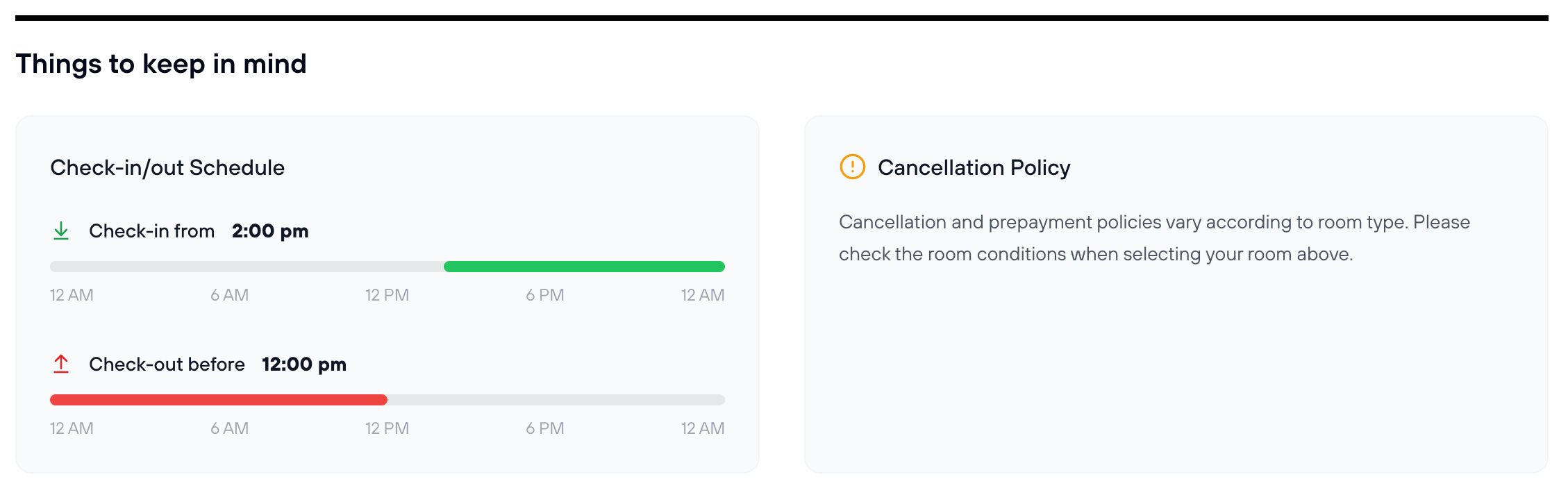
Hotels have standard check-in and check-out times. Review these times to help your customers plan their arrival and departure effectively. Late checkout or early check-in may be available for an additional fee (as noted in the paid services section).

Hotel check-in and check-out times with visual timeline

Screenshot: Check-in and check-out time windows displayed on a timeline for easy reference.

Standard Hotel Hours

  • Check-in: Typically 2:00 PM or 3:00 PM (check-in details for specific hotel)
  • Check-out: Typically 11:00 AM or 12:00 PM (check-out details for specific hotel)
  • Flexibility: Many hotels allow flexible check-in times if you arrive early, subject to room availability

Ready to Book?

Once you've reviewed the hotel details, room options, pricing, cancellation policies, and amenities, and selected your preferred room, click the "Choose" button to proceed to the final booking stage where you'll enter guest details, review pricing, and complete payment.

Next Step: Learn how to complete the hotel booking in our Making the Booking guide.

Making the Booking

After selecting your preferred room and clicking "Choose," FX-Port guides you through the final booking stage. You'll enter guest details, review the complete booking summary with pricing and fees, and then complete payment to confirm your hotel reservation.

Step 1: Enter Guest Details

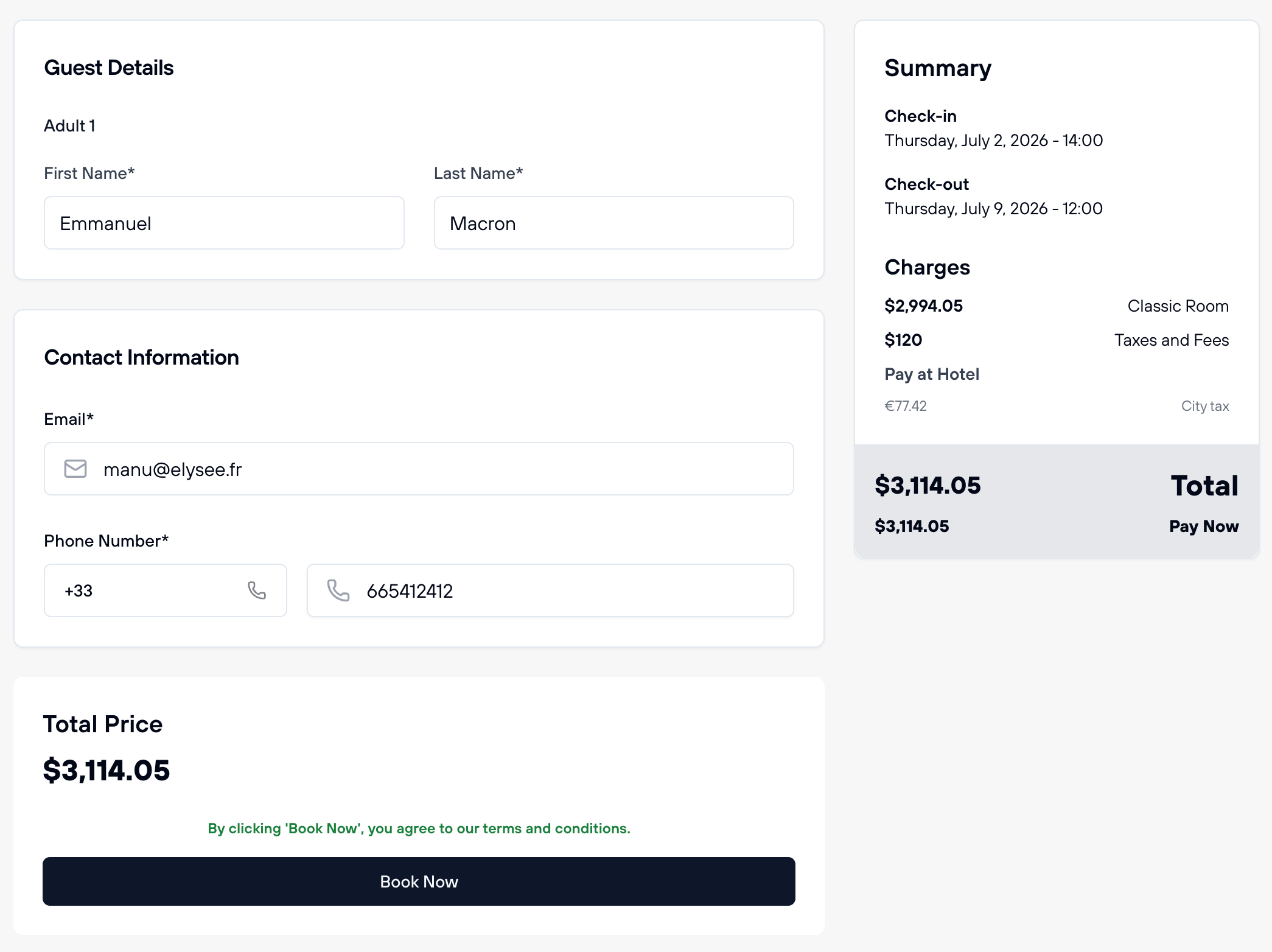
You'll see a booking form requesting details for each guest. Enter accurate information for the primary guest and any additional guests staying in the room.

Booking form with guest details, contact information, and payment summary

Screenshot: Hotel booking form showing guest details fields, contact information, and booking summary on the right side.

CRITICAL: Use Traveler Contact Information Only

You MUST provide the traveler's phone number and email address, NOT your agency's contact details. This is a critical requirement for several reasons:

  • Direct Communication: In case of delays, cancellations, changes, or emergencies, the hotel and FX-Port support must be able to contact the actual traveler directly
  • Legal Requirements: Many jurisdictions require booking platforms to have direct contact information with the actual guest for legal and regulatory purposes
  • Check-in/Check-out: The hotel will need to contact the guest directly for check-in instructions, late arrival notifications, or early departure coordination
  • Account Liability: Failure to provide traveler contact information is a direct breach of the FX-Port Service Agreement

Repeated violations of this requirement may result in account suspension, account termination, and legal liability for the agency.

What to Enter: First name, last name, email address, and phone number of the actual guest who will be staying at the hotel. This information must be provided for each person sharing the room.

Step 2: Review Booking Summary

Before completing payment, review the complete booking summary displayed on the right side of the screen. This includes:

  • Check-in and Check-out Dates: Verify the correct dates for the stay
  • Room Details: Confirm the room type and any special requests
  • Room Rate: The nightly or total room charge
  • Taxes and Fees: Any applicable taxes or service fees included in the rate
  • Pay at Hotel: Any amounts that will be collected by the hotel (such as VAT/taxes in certain jurisdictions)
  • Total Price: The total amount due, which will be charged to your account

Important: Review All Charges

Make sure you understand all charges and verify that VAT/taxes are clearly marked as "Pay at Hotel" if applicable. This helps ensure your customer is aware they will need to pay these amounts directly at the property and won't be surprised at check-in.

Step 3: Complete Payment

Once you've reviewed all details and confirmed everything is correct, click the "Book Now" button to complete the booking. The payment will be processed immediately, and you'll receive a confirmation page with your booking reference number and reservation details.

Booking Confirmation: After successfully completing the booking, you'll see a confirmation page with the booking reference, hotel details, and guest information. You can download the PDF voucher from this page to share with your customer.

Managing Your Bookings

After booking hotels, you can access, review, and manage all your reservations from the Bookings page. FX-Port provides comprehensive post-booking tools to help you track bookings, download vouchers, and make cancellations when the hotel's cancellation policy permits.

Accessing Your Hotel Bookings

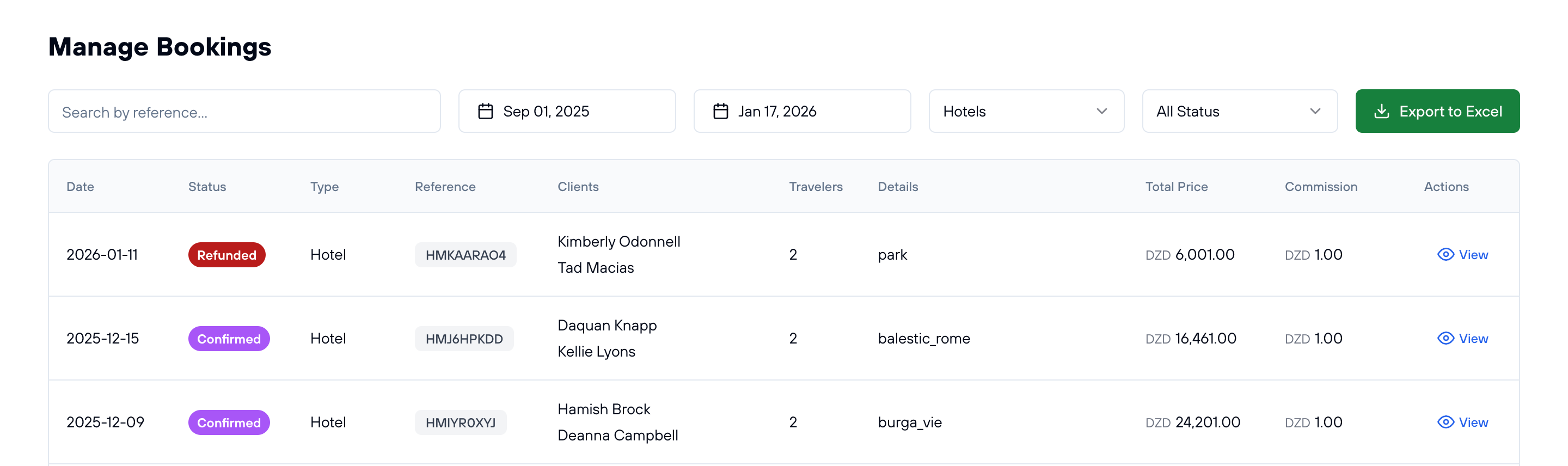
Navigate to the Bookings section in your FX-Port dashboard and select "Hotels" from the service filter. You'll see a comprehensive list of all your hotel bookings with key information at a glance.

Hotel bookings list showing date, status, reference, clients, travelers, and pricing information

Screenshot: Hotel bookings management page showing all reservations with filtering and sorting options.

Booking List Features

  • Date Filters: Filter bookings by date range to quickly find specific reservations
  • Search by Reference: Search using the booking reference number for quick lookup
  • Status Filter: Filter by confirmation status (Confirmed, Pending, Cancelled, etc.)
  • View Details: See pricing, commission earned, guest names, and traveler information
  • Export to Excel: Download your bookings data for accounting and reporting purposes

Viewing Individual Booking Details

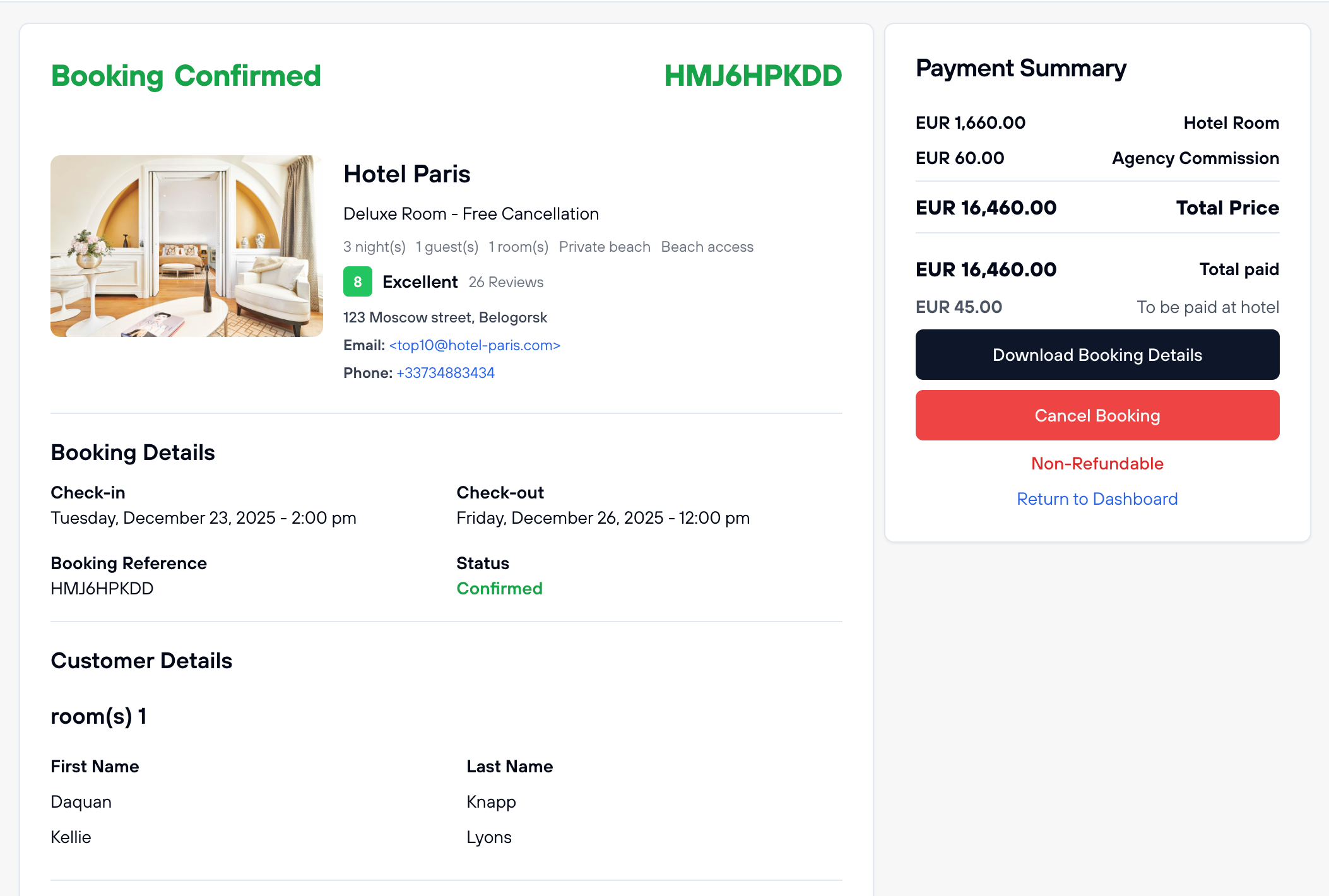
Click the "View" button on any booking to see complete details including hotel information, guest names, pricing breakdown, and booking confirmation status.

Detailed view of single hotel booking showing confirmation, pricing, guest details, and management options

Screenshot: Individual booking detail view with complete reservation information and management options.

Single Booking Details Include

  • Booking Confirmation Status: Whether the reservation is confirmed, pending, or cancelled
  • Hotel Information: Property name, address, contact details, and rating
  • Room Details: Room type, meal inclusions, and any special notes
  • Guest Names: All guests staying in the room
  • Pricing Breakdown: Room rate, taxes, fees, VAT (if applicable), and total price
  • Commission Earned: Your agency commission on this booking
  • Check-in/Check-out Times: Hotel check-in and check-out schedule
  • Cancellation Policy: Hotel's cancellation rules and deadlines

Download Booking Voucher

From the individual booking details page, you can download a PDF voucher containing all the reservation information. This voucher can be emailed directly to your customer and is everything they need for check-in.

Voucher Contents: The PDF includes booking reference, hotel details, guest names, room type, check-in/check-out information, pricing breakdown, cancellation policy, and hotel contact information. Share this with your customer before their arrival.

Cancel a Hotel Booking

If the hotel's cancellation policy allows, you can cancel bookings directly from the booking details page. Hotel cancellations are typically processed instantly, and any refundable amounts are automatically returned to your account balance.

Important Cancellation Notes

  • Check Cancellation Policy First: Review the hotel's cancellation policy to confirm whether cancellation is allowed and what fees (if any) apply
  • Instant Processing: Hotel cancellations are usually processed immediately
  • Automatic Refunds: Refundable amounts are automatically returned to your account balance
  • Non-Refundable Bookings: If a booking is marked non-refundable, cancellation will not result in any refund

Have any questions or something is not clear? Contact us

FX-PORT

Your trusted B2B travel distribution platform. Access global inventory and grow your business with better rates and easy tools.

Flight Services

FX-Port is a comprehensive B2B flight distribution platform enabling travel agencies to access and sell flight tickets worldwide. With connections to over 500 airlines, agencies can offer competitive wholesale rates with instant confirmations and automated ticketing.

Our platform provides real-time availability, price comparison tools, and automated booking management. Travel agencies can access exclusive B2B airfares, manage commissions, and streamline their flight operations through our integrated system.

Accommodation Services

Access our extensive network of over 1.5 million properties worldwide through our B2B hotel booking platform. Travel agencies can offer competitive rates with guaranteed margins and instant room confirmations across all accommodation categories.

From luxury resorts to budget-friendly options, our platform provides comprehensive property information, dynamic pricing, and automated booking management for seamless hotel distribution.

Travel Solutions

Comprehensive transfer services with a global network of verified providers, offering airport transfers, city tours, and professional chauffeur services. Our ferry booking system connects major maritime routes with instant booking capabilities and competitive B2B rates.

Specialized Umrah packages with end-to-end services including visa processing, accommodation, and transportation. Custom travel packages with dynamic pricing and automated inventory management for travel agencies.

FX-Port revolutionizes B2B travel distribution with cutting-edge technology and comprehensive solutions. Our platform enables travel agencies to access global inventory, manage bookings efficiently, and grow their business with competitive rates and automated tools.

With support for multiple currencies, local payment processing, and 24/7 customer service, we ensure seamless operations for travel agencies worldwide. Our platform features real-time availability, instant confirmations, and comprehensive booking management tools.

Travel agencies can leverage our platform to offer a complete range of travel services, including flight bookings, hotel reservations, transfer services, ferry tickets, Umrah packages, and custom travel experiences. Our B2B marketplace connects agencies with verified suppliers worldwide.

FX-Port provides enterprise-grade security, automated commission management, and detailed analytics for business growth. Join hundreds of successful agencies using our platform to streamline their operations and expand their market presence.

© 2026 FX-PORT. All rights reserved.