Back to Training
Flights

How to Book Flights with FX-Port

A comprehensive guide to flight booking workflows, fare rules, airline partnerships, and maximizing your air travel sales.

Flight Booking Overview

FX-Port is a comprehensive B2B flight booking platform designed for travel agencies and corporate travel departments. Our platform integrates with multiple global distribution systems (GDSs), aggregators, consolidators, and direct airline integrations to provide you with the best fares and availability across thousands of flight routes worldwide. We're constantly expanding our coverage to add additional routes, airlines, and exclusive negotiated/private fares.

Flight Types Supported

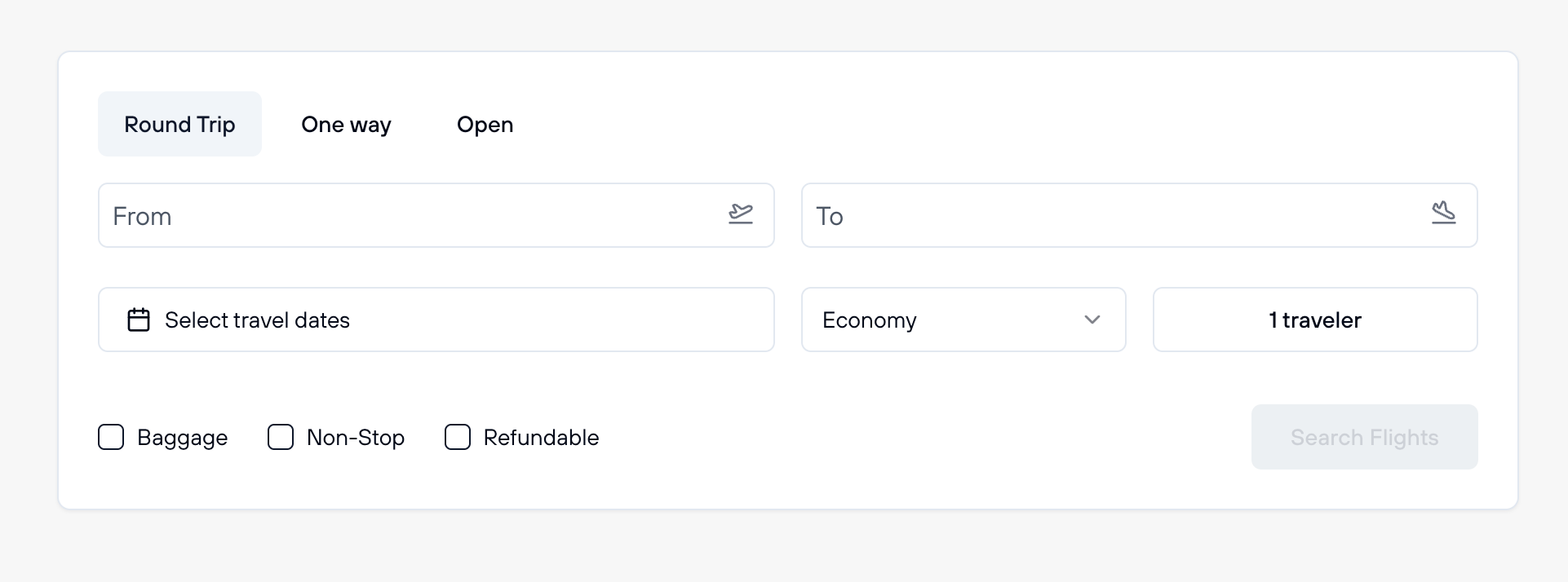
FX-Port supports three flight search types to match your travel needs:

  • One Way: Book a flight from one airport to another without a return ticket. Ideal for one-direction travel.
  • Round Trip: Depart from and return to the same airports. For example, Paris to Dubai, then Dubai back to Paris. The most common choice for round-trip travelers.
  • Open: Depart from one airport and return from a different airport. Perfect for flexible itineraries—for example, fly from Paris to New York and return from Boston to Rome.

Airport Selection

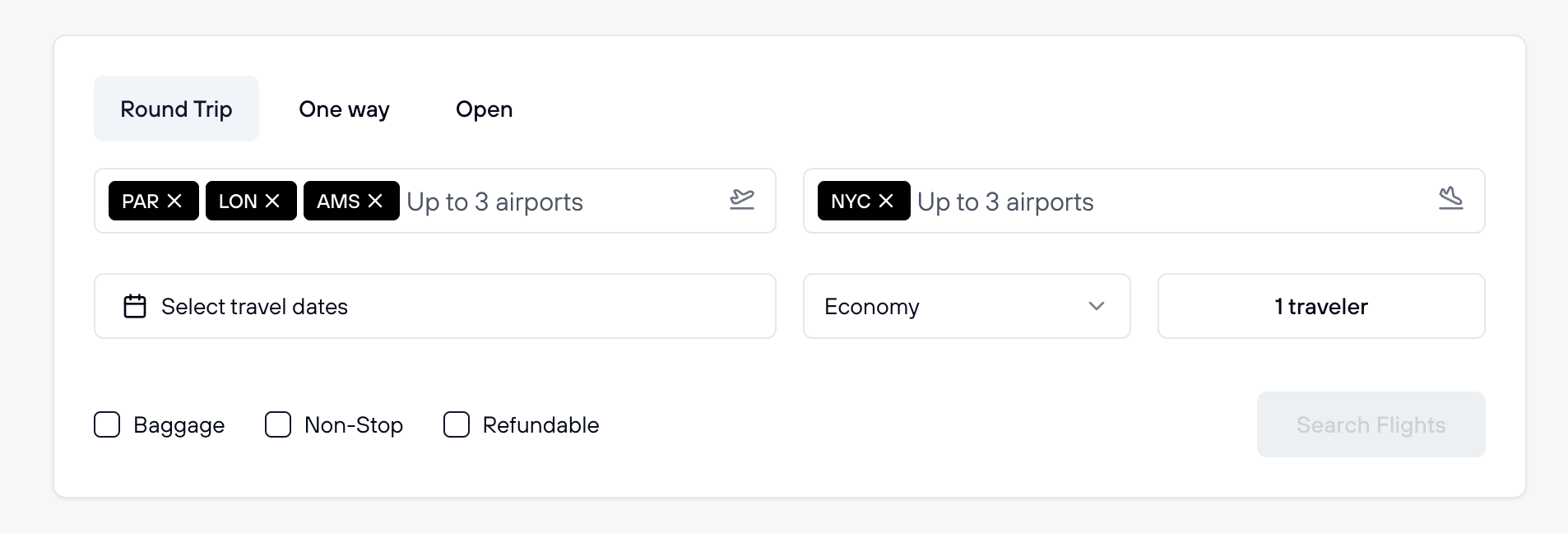
The 'From' and 'To' airport fields support up to 3 airports per field, allowing flexible travelers to search across multiple departure or arrival cities simultaneously.

Multi-Airport Search Benefits:

    Multi-airport selection showing up to 3 airports in From and To fields

    Screenshot: Multi-airport selection showing up to 3 airports you can add to departure and arrival fields

    Important Note:

    This multi-airport feature is not available from all flight suppliers FX-Port works with. When a supplier doesn't support multiple airports, only the first airport you entered in each field will be used for the search.

    Cabin Categories

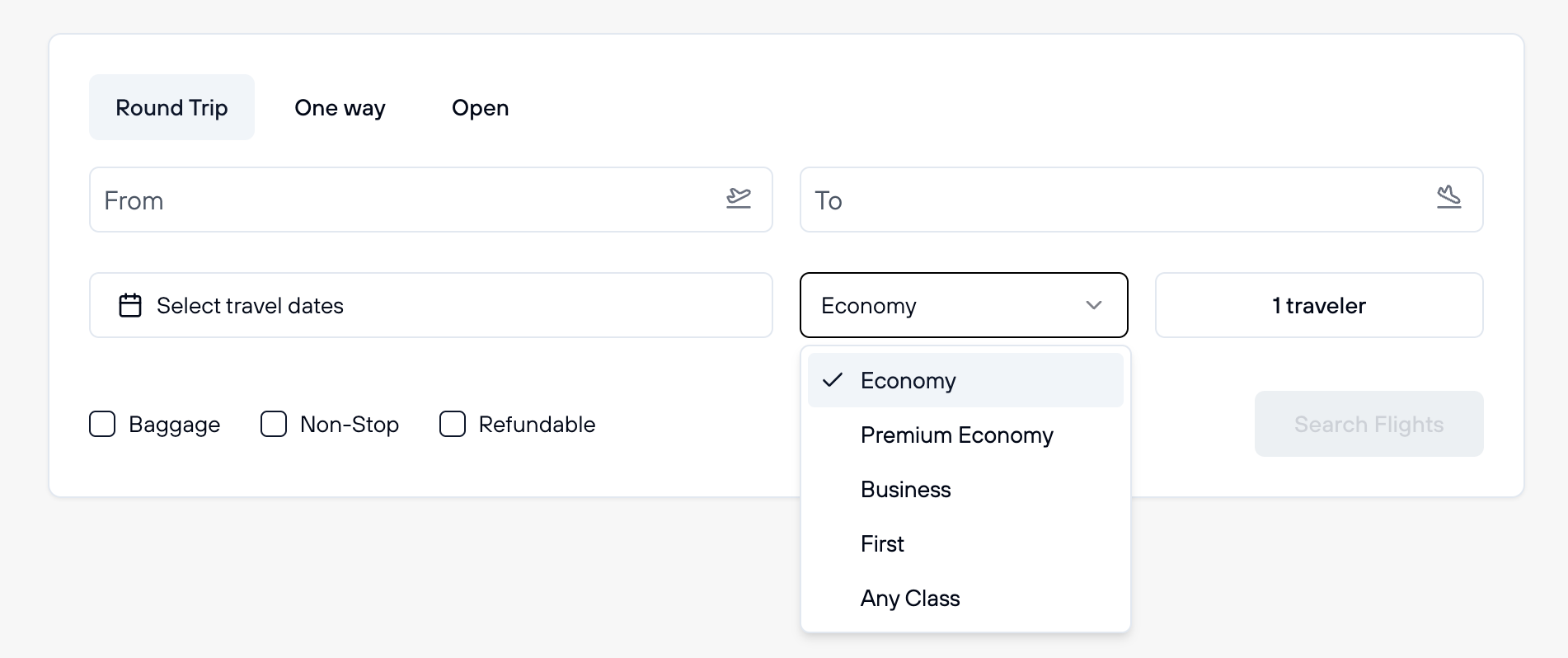
    Select your preferred cabin class to match your comfort level and budget. By default, searches are set to Economy. Available cabin options include:

    • Economy: The standard seating option for budget-conscious travelers.
    • Premium Economy: Enhanced comfort with more spacious seating and better amenities.
    • Business: Premium service with lie-flat beds, fine dining, and priority services.
    • First Class: The highest level of luxury with exceptional comfort and personalized service.
    • Any Cabin: Search across all cabin classes simultaneously. Useful during peak travel periods when economy seats may be sold out, giving you more flight options even if you prefer to upgrade your cabin class.
    Cabin class selection dropdown showing Economy, Premium Economy, Business, First Class, and Any Cabin options

    Screenshot: Cabin class selection dropdown with all available options including Economy, Premium Economy, Business, First Class, and Any Cabin

    Travelers and Passenger Types

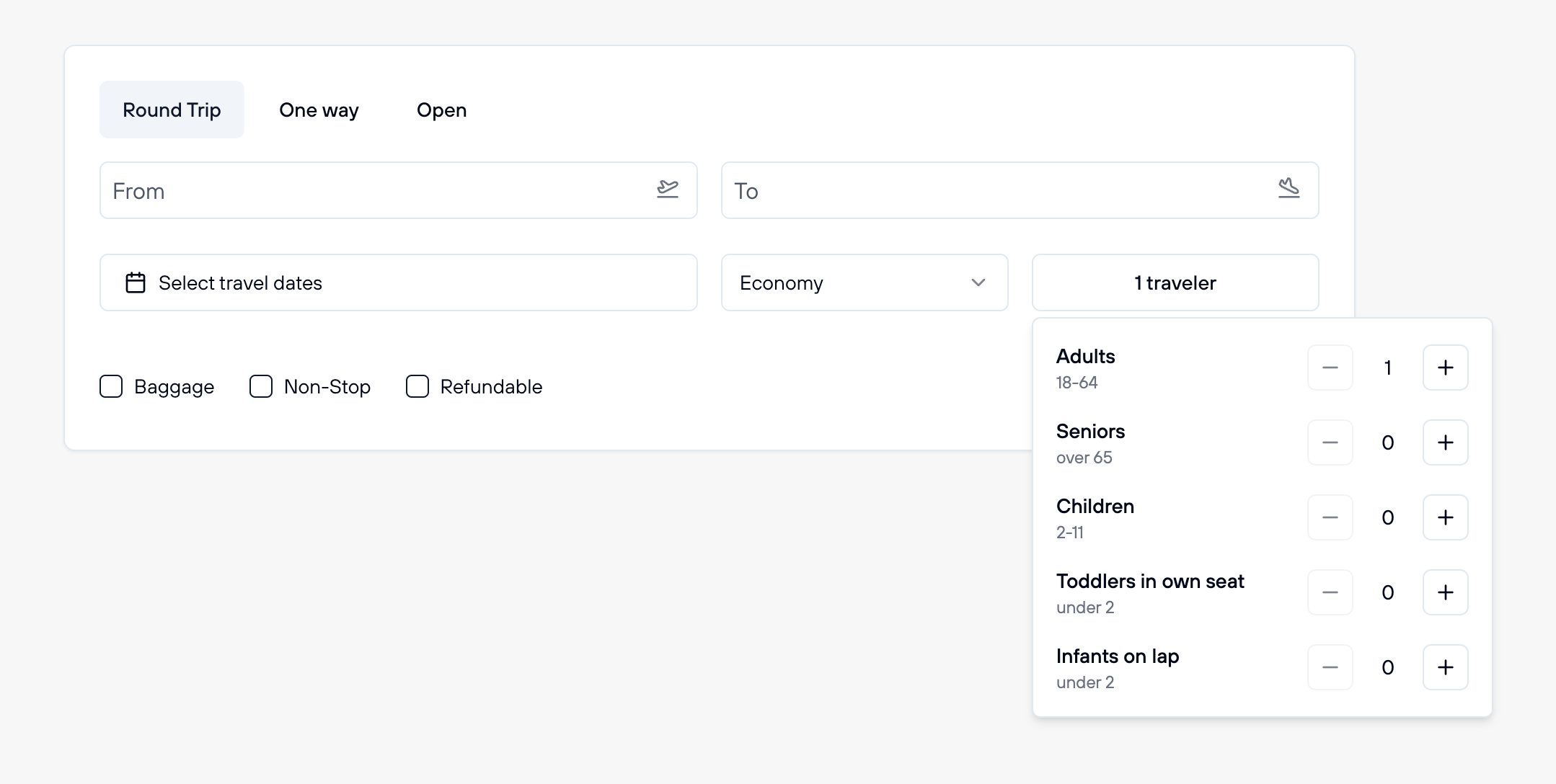
    FX-Port supports up to 9 travelers per booking. When specifying passengers, you can select from the following categories:

    • Seniors: Passengers aged 60 or older, eligible for senior fares on many airlines.
    • Adults: Standard passengers aged 12 and above.
    • Children: Young passengers aged 2-11 who occupy their own seat.
    • Toddlers: Children under 2 years old, available as either seated (occupying a seat) or in-lap (not occupying a seat, staying with an adult).
    Traveler type selection showing options for Seniors, Adults, Children, and Toddlers

    Screenshot: Traveler type selection interface showing options to add Seniors, Adults, Children, and Toddlers with their respective counts

    Important Passenger Rules:

      Understanding Search Results and Flight Filters

      After searching for flights, FX-Port displays available options with all the information you need to make an informed decision.

      Flight Search Result Cards

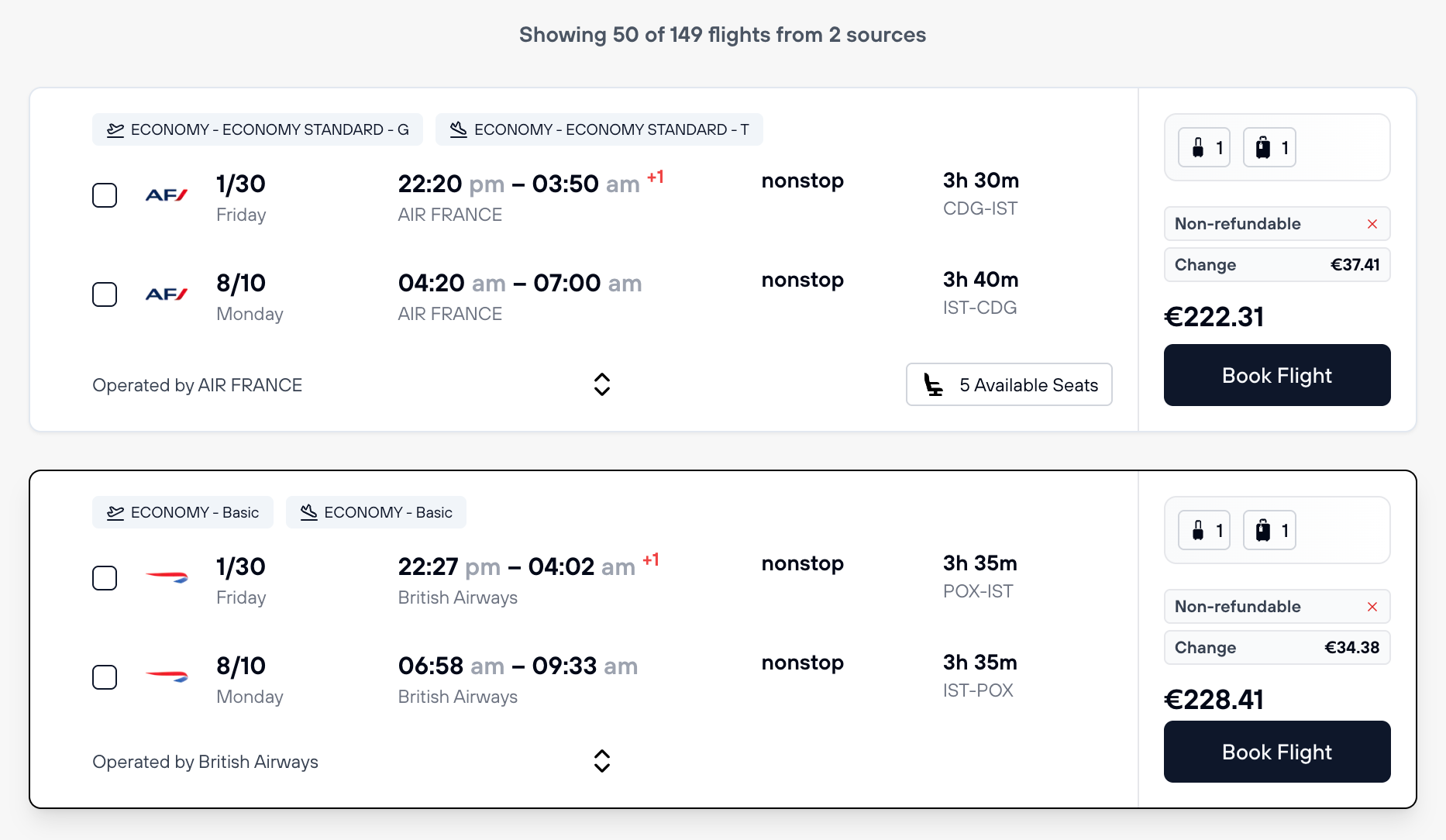
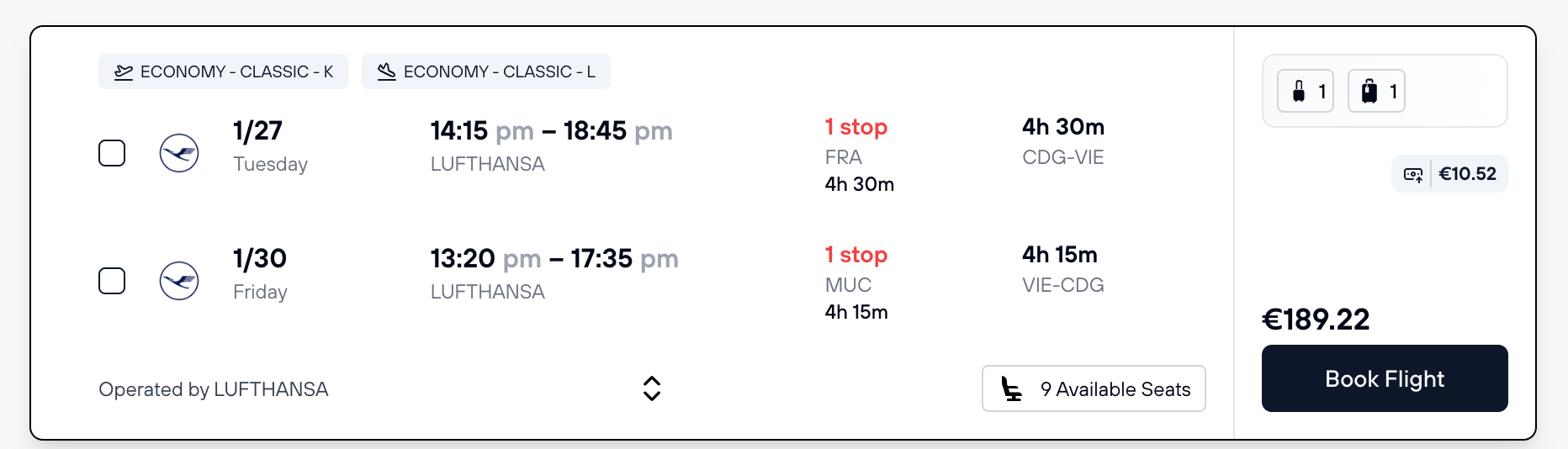
      Each flight in the search results displays key information in a card format, allowing you to quickly compare options and identify the best matches for your customers.

      Flight search result cards showing airline, dates, times, duration, price, and fare policies

      Screenshot: Flight result cards displaying airline logo, departure and arrival dates/times, flight duration, number of stops, cabin class, price, and fare policy information

      What Each Card Shows:

        Important Note About Pricing:

        The price shown on the flight card is for the entire booking, not per passenger. If you're booking for 5 travelers, the displayed price covers all 5 passengers. This makes it easy to see the total cost at a glance.

        Viewing Detailed Flight Information

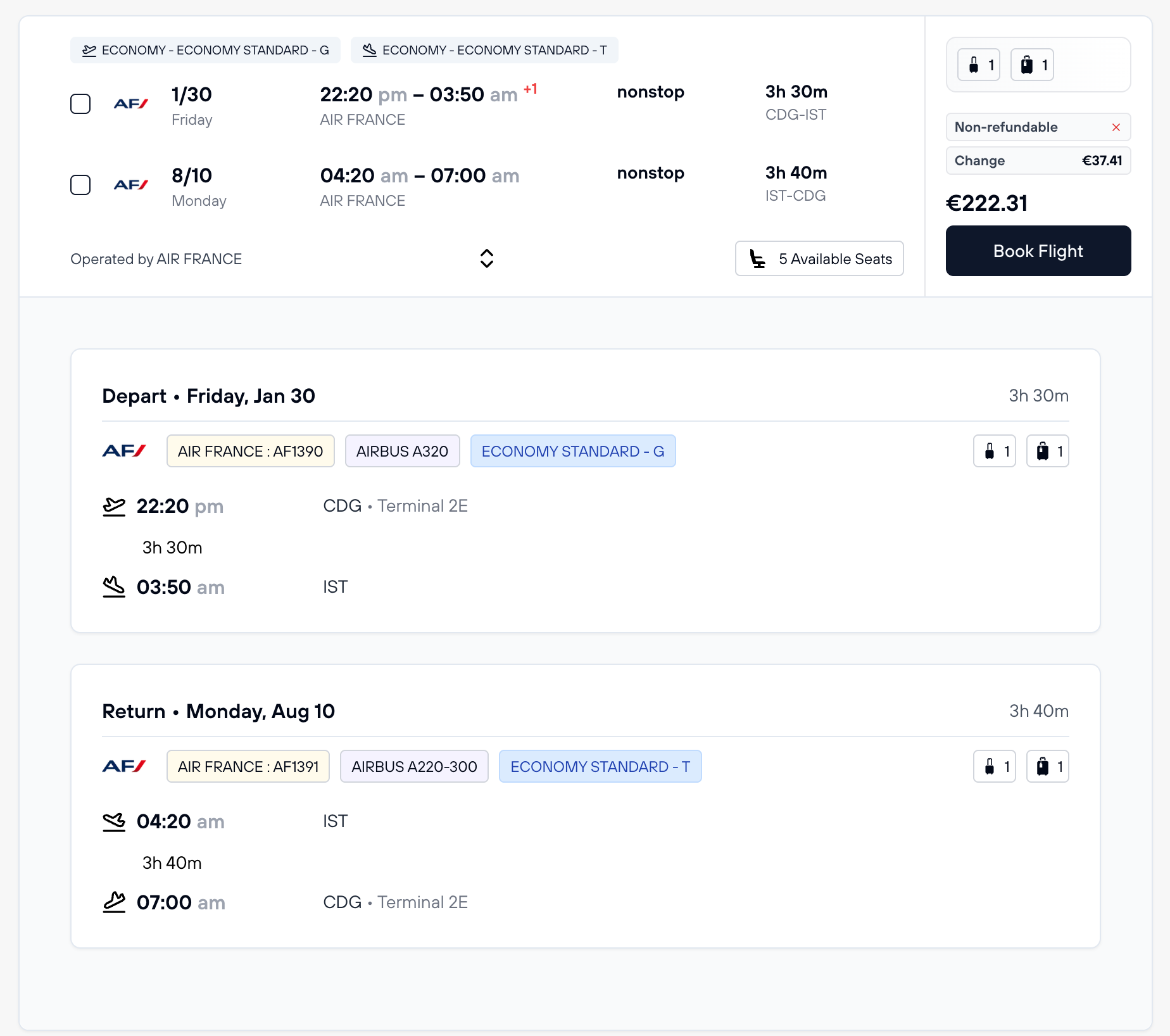
        Click on any flight card to expand it and view comprehensive details about the flight, including aircraft type, specific flight numbers, layover times, and more.

        Expanded flight details showing full itinerary, flight numbers, aircraft types, and segment durations

        Screenshot: Detailed flight view showing complete itinerary with flight numbers, aircraft types, departure/arrival times, segment durations, and layover information

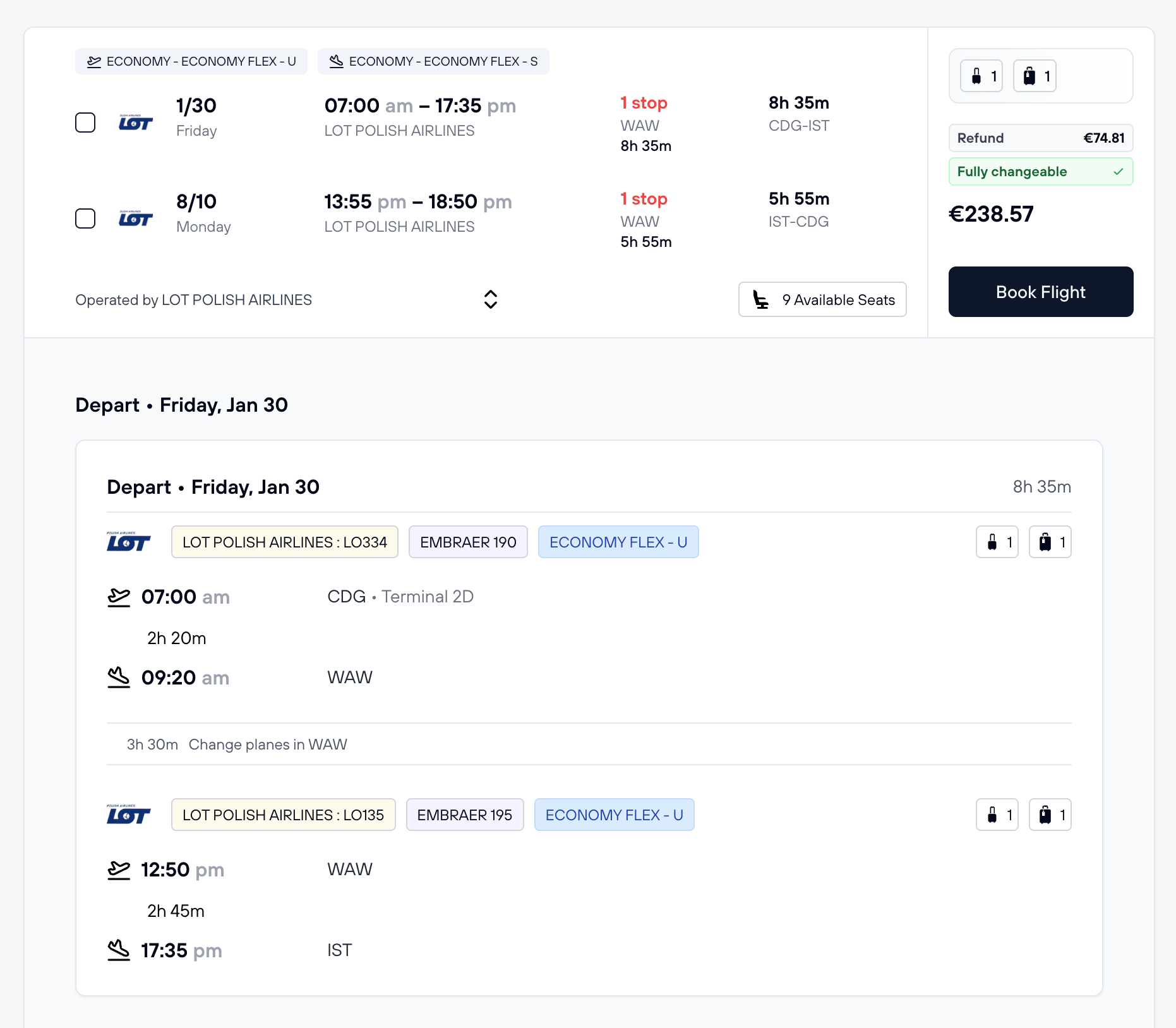
        What You See in Detail View:

          Flight details showing layover/stop information with duration displayed

          Screenshot: Detailed itinerary showing layover times and connections, allowing travelers to assess connection feasibility

          Viewing Commission Information

          As an agency, you can quickly see how much commission you'll earn from each flight. Simply hover your mouse over the price, and a tooltip will display your earned commission based on your configured commission rules.

          Price tooltip showing earned commission amount when hovering over flight price

          Screenshot: Hovering over the price displays your earned commission for that flight booking

          This feature allows you to quickly assess the profitability of each flight option and make informed decisions about which flights to recommend to your customers based on your earnings goals.

          Flexible Date Calendar

          At the top of search results, FX-Port displays a calendar grid showing flight prices for ±3 days around your selected dates. This visual tool helps identify significantly cheaper alternative dates, allowing flexible travelers to save money or find better flight options.

          Flexible dates calendar showing price variations across multiple dates with color coding

          Screenshot: Flexible dates grid showing prices for nearby dates, with color coding to highlight cheaper (green) and more expensive (red) options

          If your customer has flexible travel dates, this calendar is invaluable for finding the best deals. Green-highlighted dates typically indicate lower prices, while red highlights show more expensive dates. Use this to have informed conversations with your customers about when they might travel for the best value.

          Using Flight Filters

          FX-Port provides powerful filters to narrow down search results based on specific requirements. These filters work together to help you find exactly what you're looking for.

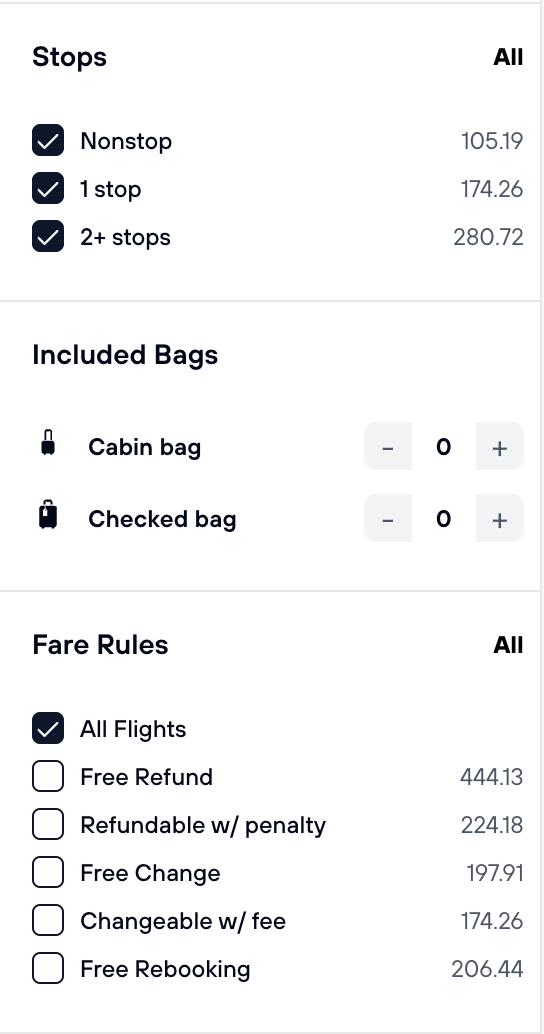
          Filter 1: Stops, Baggage Allowance, and Fare Rules

          These filters help you refine results based on flight characteristics and policies:

          Stops Filter:

            Baggage Allowance Filter:

            Customize by number of free checked and carry-on bags included in the fare. Please note: some airlines allow additional bags to be purchased directly on FX-Port or at the airport/airline website.

            Fare Rules Filter:

              Filter panel showing stops, baggage allowance, and fare rules options

              Screenshot: Filter panel displaying options for stops, included baggage, and fare policies

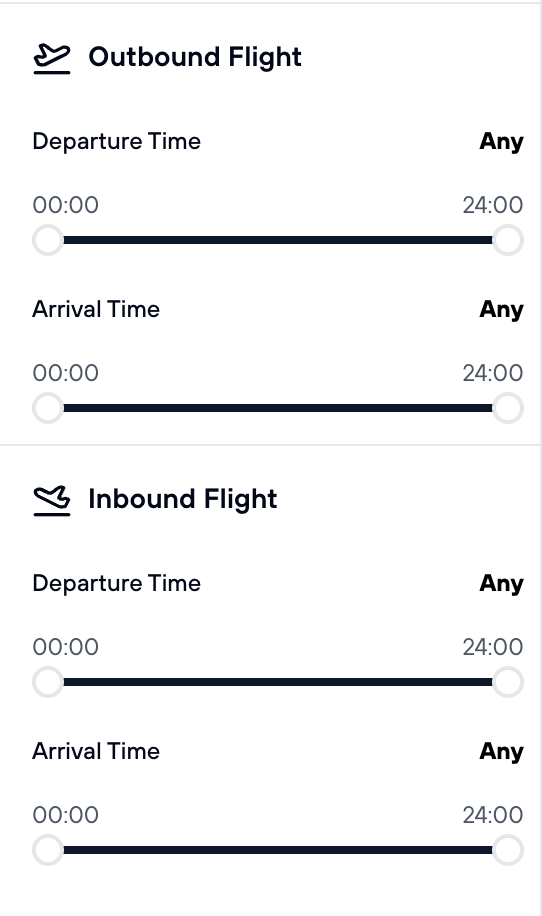
              Filter 2: Departure and Arrival Times

              Use time filters to find flights that match your customer's preferences for when they want to depart or arrive. This is useful when customers have specific schedules, such as needing to arrive before a meeting or event, or preferring to depart at certain times of day.

              Time Filter Capabilities:

                Time range sliders for outbound and inbound flight departure and arrival times

                Screenshot: Time filters for both outbound and inbound flights with adjustable range sliders

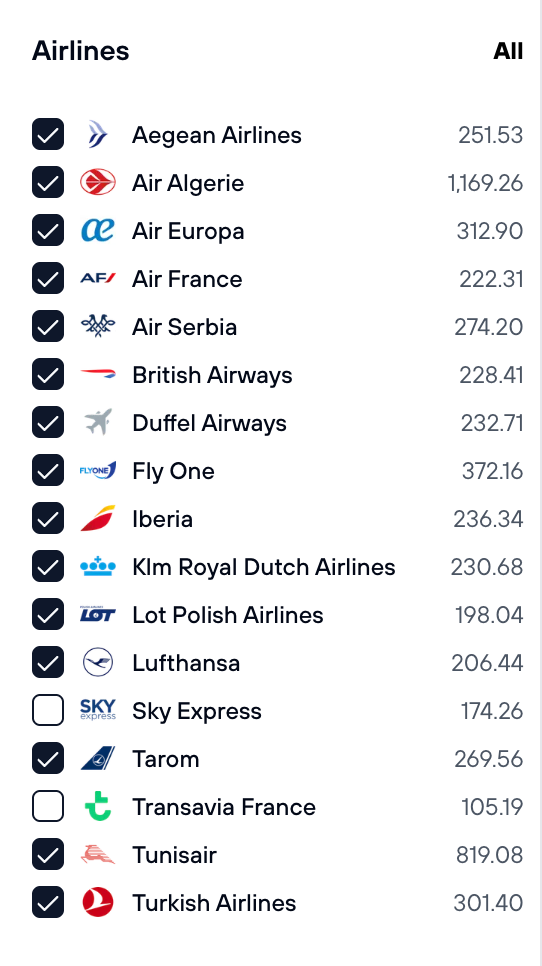
                Filter 3: Airlines

                Filter results to show only flights from specific airlines or exclude airlines your customer prefers to avoid. This is an excellent way to personalize search results based on customer preferences, loyalty programs, or airline reputations.

                Airline Filter Uses:

                  Airlines filter showing list of airlines with checkboxes and flight count

                  Screenshot: Airlines filter with checkbox options for each carrier and flight count per airline

                  Filters Work Together—Be Careful

                  Filters Work Together—Be Careful

                  Be careful when combining filters. For example, if you filter for only nonstop flights AND fully refundable flights, you may miss excellent options that have one stop but are much cheaper or refundable with a small penalty. Similarly, restrictive time filters might hide good flights outside those time windows. Always inform customers about filter limitations.

                  Filter Best Practices:

                    Understanding Result Display and Ordering

                    Display and Sorting:

                      Making the Booking

                      Once you've selected your flights, FX-Port guides you through a straightforward booking process. You'll enter detailed information for each traveler, review the complete itinerary and pricing, and then complete payment.

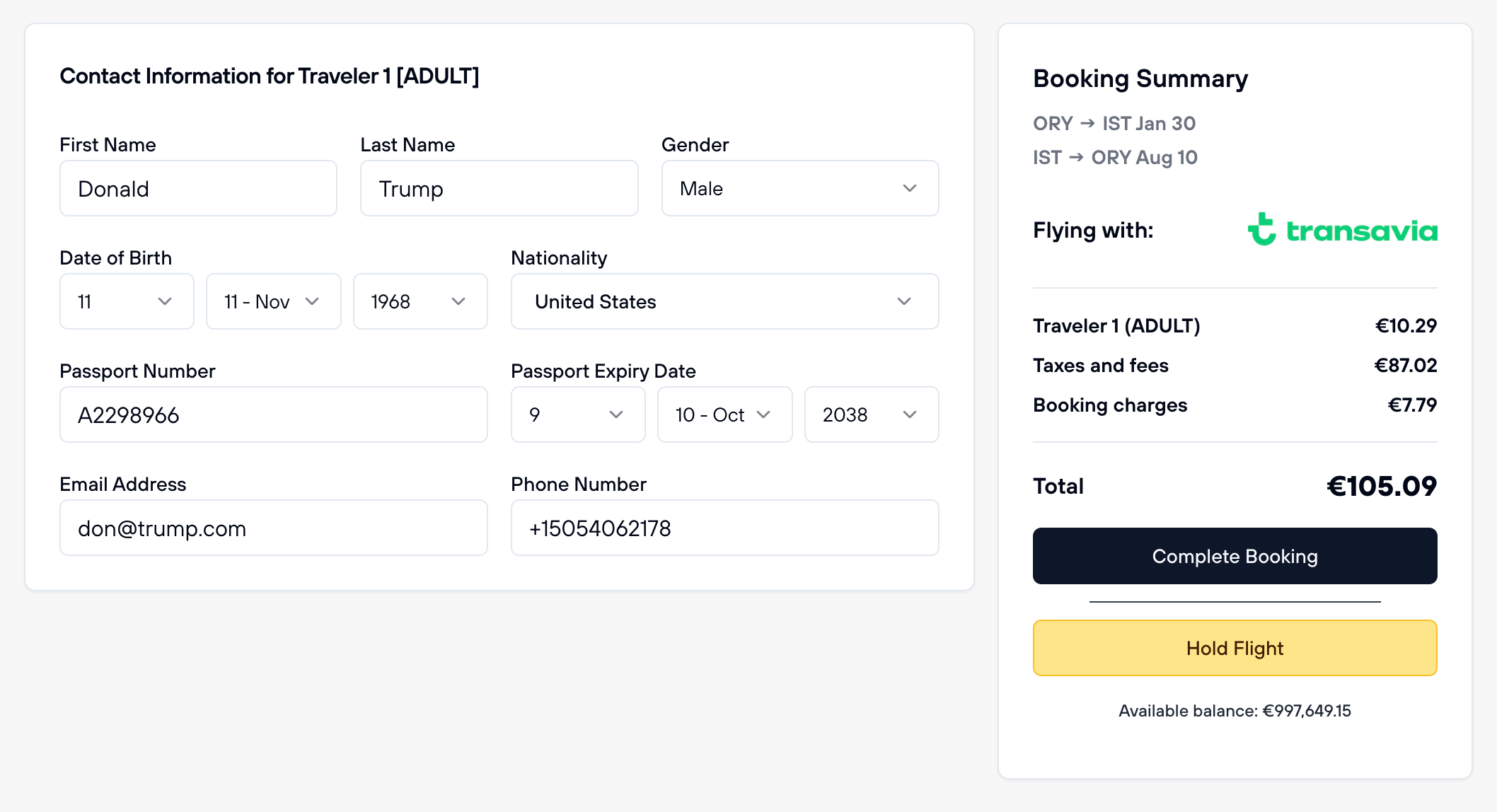
                      Step 1: Enter Traveler Details

                      After selecting your flights, you'll see a form requesting details for each traveler you selected during the search. Accuracy is critical—airline ticketing systems match passenger names exactly with the government-issued ID or passport used at the airport.

                      Traveler details form showing name, date of birth, nationality, passport, email, and phone fields

                      Screenshot: Traveler details form with fields for each passenger including name, date of birth, gender, nationality, passport information, email, and contact number

                      What You Need to Provide for Each Traveler:

                        CRITICAL: Use Traveler Contact Information Only

                        You MUST provide the traveler's phone number and email address, NOT your agency's contact details. This is a critical requirement for several reasons:

                          Repeated violations of this requirement may result in account suspension, account termination, and legal liability for the agency.

                          Critical: Passenger Age Validation

                          The system enforces strict age rules based on what was selected during search. These must match exactly:

                            Pro Tip: Verify Before Submitting

                            Double-check all passenger names and dates of birth before confirming. Name corrections after booking can be expensive (some airlines charge change fees), and incorrect dates of birth may result in ticketing errors. It's much easier to fix details now than after the booking is confirmed.

                            Step 2: Review Your Booking Summary

                            Before finalizing payment, you'll see a complete booking summary showing all details. Review this carefully to ensure everything is correct.

                            Your Booking Summary Includes:

                              Step 3: Complete Payment and Get Confirmed

                              FX-Port uses your available account balance to process the booking. Once payment processes successfully, your booking is immediately confirmed.

                              • Access in Dashboard: Booking immediately appears in your Bookings section for management

                              Save Your Booking Reference

                              The booking reference (PNR) is unique to each booking. Share this with your customers—they'll need it for check-in, seat selection, and any inquiries with the airline. We recommend sending them the confirmation email immediately after booking.

                              Managing Your Bookings

                              After booking flights, you can access, review, and manage all your reservations from the Bookings page. FX-Port provides comprehensive post-booking tools to help you track bookings, download tickets, and make changes when allowed by airline policies.

                              Access Your Flight Bookings

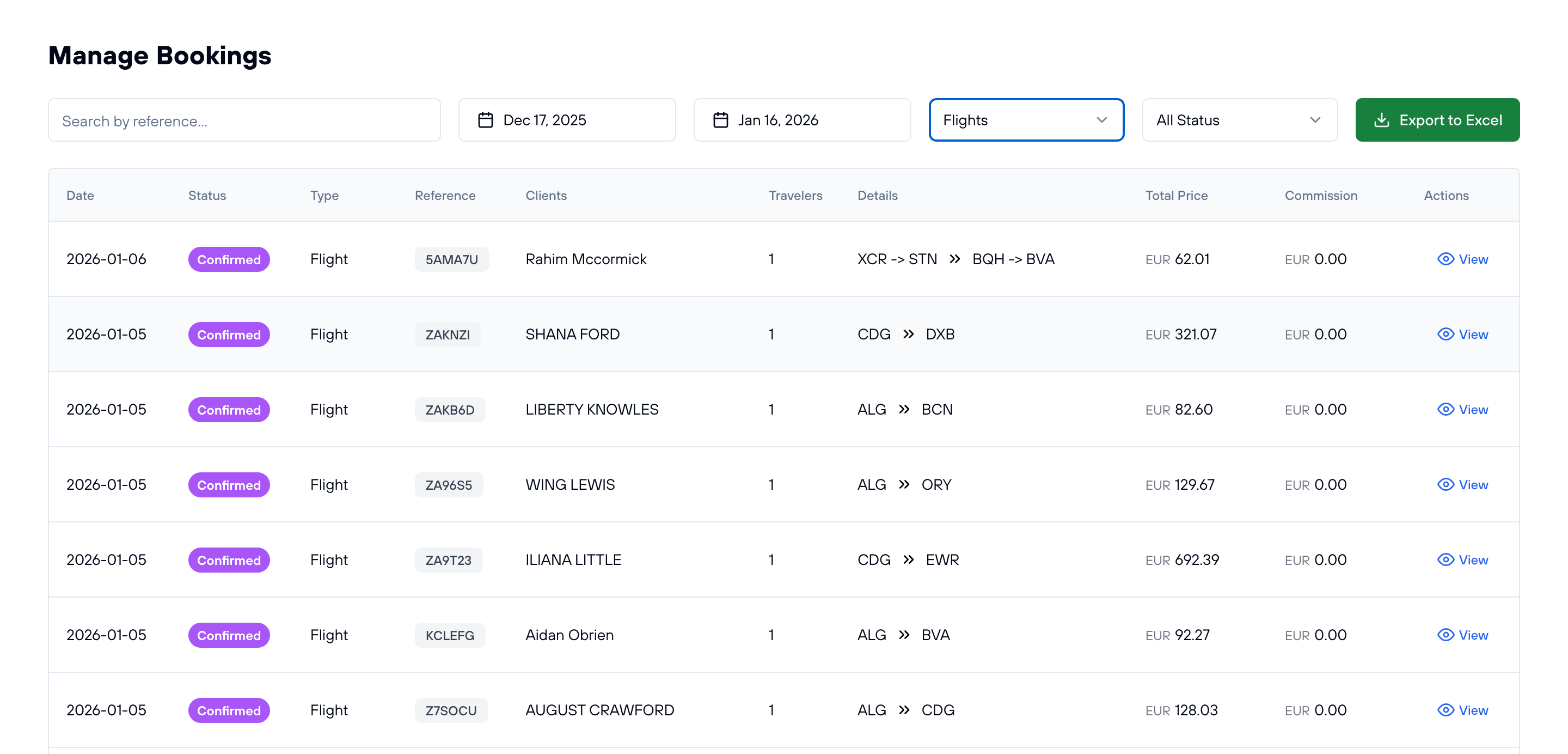
                              Navigate to fx-port.com/dashboard/bookings to see a complete list of all your flight bookings.

                              Manage bookings page showing list of flight bookings with filters, dates, status, travelers, and booking details

                              Screenshot: Bookings management page displaying all flight reservations with search, filters, and detailed information

                              What You See on the Bookings Page:

                                View and Manage Specific Flight Bookings

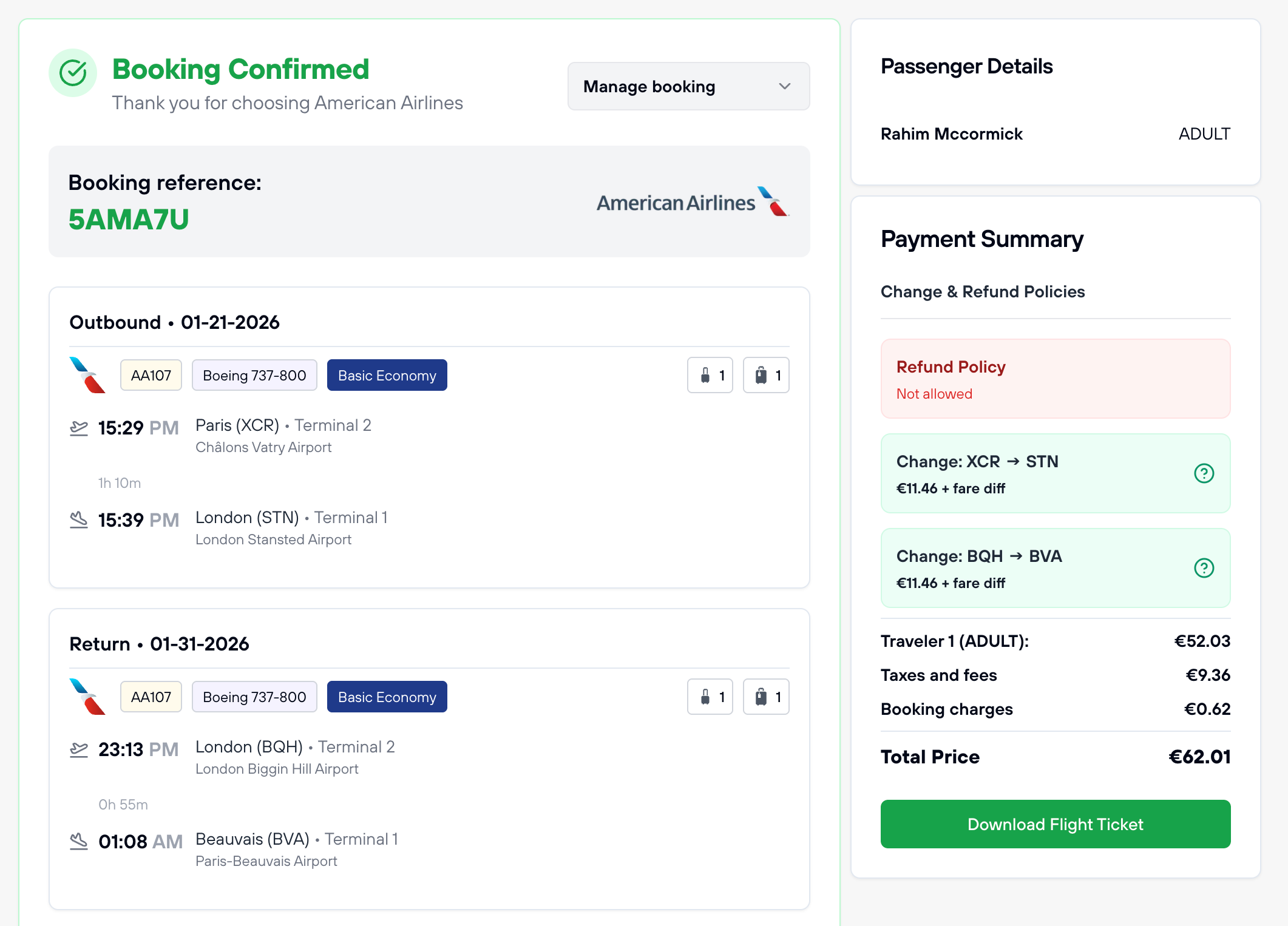
                                Click the 'View' button next to any booking to open the detailed booking management page.

                                Flight booking details page showing itinerary, passenger information, payment summary, and management options

                                Screenshot: Detailed booking view with full itinerary, passenger details, payment summary, and action buttons

                                Available Actions and Features:

                                  Important Notes About Cancellations and Changes

                                  Automatic Cancellations May Not Always Be Available

                                  Some flights cannot be cancelled automatically through the platform due to supplier or airline restrictions. When automatic cancellation is not available, FX-Port allows you to submit a cancellation request, and our team will contact the airline directly to intervene on your behalf. While we often achieve positive results, success is not guaranteed and depends on the airline's policies. Any fees charged by the airline for cancellation will be deducted from your agency balance—make sure to communicate these potential costs to your travelers upfront.

                                  Holding Flights: Limited Availability

                                  Not all flights support the "Hold" option. The ability to hold a flight depends on the carrier, supplier, and fare policies. Some airlines allow you to hold the seat only (without freezing the price), while others let you freeze both the seat and price for a few hours. These options are limited and controlled by the airlines and suppliers. FX-Port displays all available hold options and their terms during the booking process, so you can review them before confirming.

                                  Refund and Exchange Important Rules:

                                    Have any questions or something is not clear? Contact us for support.

                                    FX-PORT

                                    Your trusted B2B travel distribution platform. Access global inventory and grow your business with better rates and easy tools.

                                    Flight Services

                                    FX-Port is a comprehensive B2B flight distribution platform enabling travel agencies to access and sell flight tickets worldwide. With connections to over 500 airlines, agencies can offer competitive wholesale rates with instant confirmations and automated ticketing.

                                    Our platform provides real-time availability, price comparison tools, and automated booking management. Travel agencies can access exclusive B2B airfares, manage commissions, and streamline their flight operations through our integrated system.

                                    Accommodation Services

                                    Access our extensive network of over 1.5 million properties worldwide through our B2B hotel booking platform. Travel agencies can offer competitive rates with guaranteed margins and instant room confirmations across all accommodation categories.

                                    From luxury resorts to budget-friendly options, our platform provides comprehensive property information, dynamic pricing, and automated booking management for seamless hotel distribution.

                                    Travel Solutions

                                    Comprehensive transfer services with a global network of verified providers, offering airport transfers, city tours, and professional chauffeur services. Our ferry booking system connects major maritime routes with instant booking capabilities and competitive B2B rates.

                                    Specialized Umrah packages with end-to-end services including visa processing, accommodation, and transportation. Custom travel packages with dynamic pricing and automated inventory management for travel agencies.

                                    FX-Port revolutionizes B2B travel distribution with cutting-edge technology and comprehensive solutions. Our platform enables travel agencies to access global inventory, manage bookings efficiently, and grow their business with competitive rates and automated tools.

                                    With support for multiple currencies, local payment processing, and 24/7 customer service, we ensure seamless operations for travel agencies worldwide. Our platform features real-time availability, instant confirmations, and comprehensive booking management tools.

                                    Travel agencies can leverage our platform to offer a complete range of travel services, including flight bookings, hotel reservations, transfer services, ferry tickets, Umrah packages, and custom travel experiences. Our B2B marketplace connects agencies with verified suppliers worldwide.

                                    FX-Port provides enterprise-grade security, automated commission management, and detailed analytics for business growth. Join hundreds of successful agencies using our platform to streamline their operations and expand their market presence.

                                    © 2026 FX-PORT. All rights reserved.